
If you mix your livestream on headphones, you might be mixing through a frequency curve you can’t see. The low end could be hyped, the upper mids might be scooped, and you’d never know until someone tells you the stream sounded thin on their TV. That’s the whole reason reference monitors like the Adam Audio A7V exist.
I’ve covered smaller nearfields before that travel in a Pelican 1510, but if you have a dedicated broadcast or mixing room, you can step up to something larger like the Adam Audio A7V. I put a pair through Rational Acoustics Smaart to see how close they actually get to flat, and what each of the voicing and tone controls really does.
One thing to note right off the bat: I reached out to Adam Audio for this pair, and they provided them to me free for this Adam Audio A7V review. I’d used A7Vs before and had a great experience with them, which is why I asked. All of the opinions and measurements here are my own.
Why a reference monitor matters
Sonarworks, the company behind SoundID Reference, has measured the frequency response of about 400 headphone models. Every one of them has a different curve.
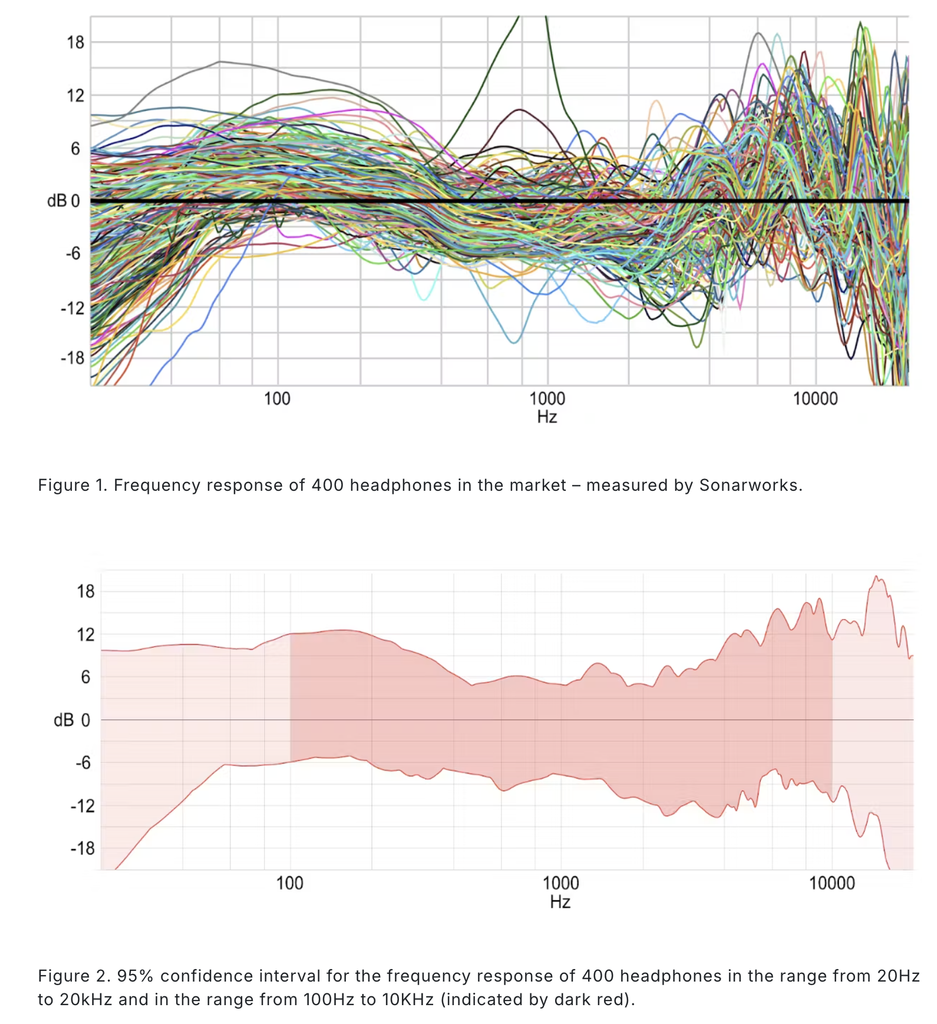
Between 100 Hz and 10 kHz, the 95% spread runs roughly +5 dB to -8 dB. Outside that range it widens to about ±12 dB or more. Two people listening to the same mix on two different pairs of headphones can be hearing a 10-20 dB difference at some frequencies.
For listening to music, that’s fine. Most of us like a little extra low end and top end. The problem is mixing on that curve. If your headphones add bass and treble, you’ll compensate without realizing it, and your actual mix ends up thin on the low end, dull on top and heavy in the mids. A flat reference monitor takes that guesswork out, so your mix has a much better chance of translating to everyone’s phones, TVs and car stereos. And that is where the Adam Audio A7V fits in perfectly.
Adam Audio A7V
The Adam Audio A7V is a two-way active nearfield monitor from Adam Audio’s A Series. It’s a step up in size from the small travel monitors I’ve reviewed, with a 7 in woofer and Adam’s ribbon tweeter, and it’s meant to live in a dedicated room where you’re making real mix decisions.
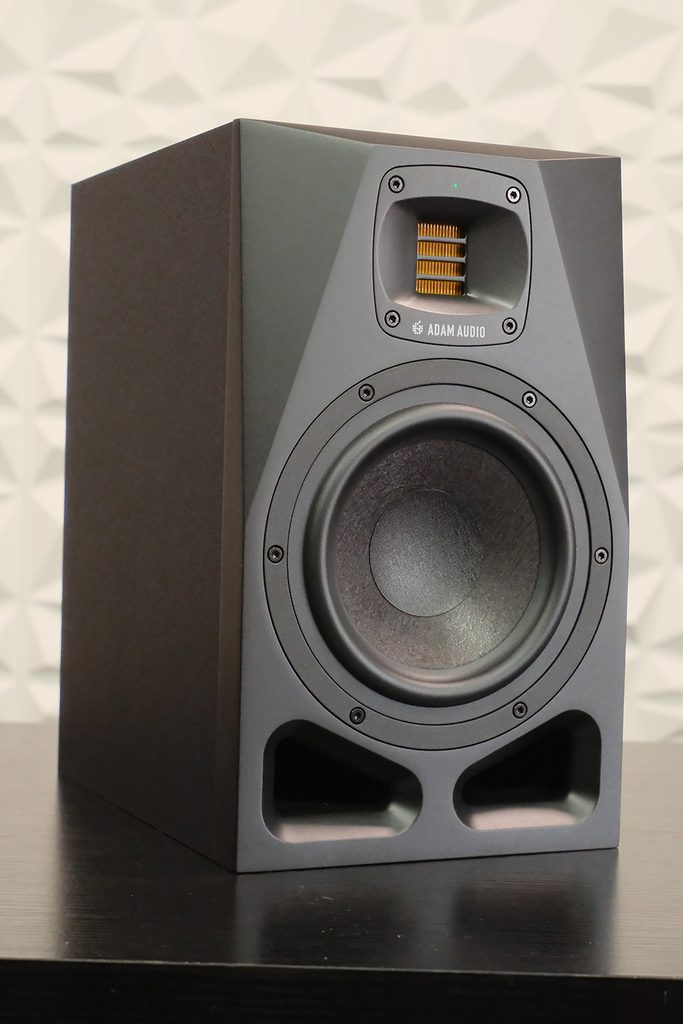
A huge benefit of this line of Adam Audio monitors is the DSP inside. That’s what gives you the two different voicing curves, the room adaptation controls on the back, and the ability to control the speakers over a network. It’s also what makes these so interesting to measure, because you can switch between settings and see exactly what each one is doing.
Here are the specs I’d actually look at before buying:
- Drivers: 7 in woofer and Adam’s X-ART folded ribbon tweeter, crossed over at 2.8 kHz
- Frequency response: 44 Hz-41 kHz (-3 dB), 40 Hz-45 kHz (-6 dB)
- Amplification: 90 W Class D woofer, 15 W Class A/B tweeter
- Max SPL: 105 dB SPL RMS, 108 dB SPL peak at 1 m
- Voicings: ‘Pure’, ‘UNR’ and ‘Ext’
- Inputs: balanced XLR and unbalanced RCA
- Remote control: Ethernet with Adam’s A Control software
Why the tweeter goes up to 45 kHz
Human hearing runs from about 20 Hz to 20 kHz, and that’s if you don’t have any hearing damage. So why would a monitor need to reproduce 45 kHz?
It comes down to the tweeter. The smaller and lighter a driver’s mass is, the faster it can move which in turn gives the ability to reproduce higher frequencies. Adam’s X-ART is a folded ribbon, so they can make the surface area much larger than a typical dome tweeter while keeping the moving mass incredibly low. More surface area moves more air, and less mass lets it reach higher frequencies.
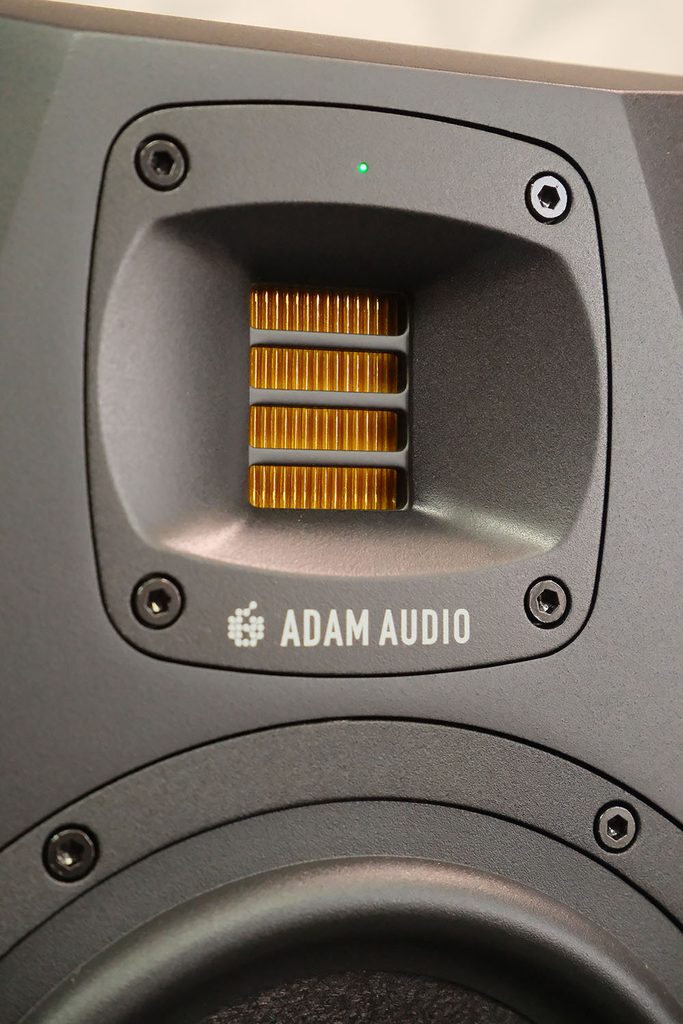
Here’s why that matters for mixing. When a tweeter is pushed near the top of its range, it starts adding distortion, including intermodulation distortion (IMD). That’s when frequencies interact inside the driver and create new tones that were never in your mix, and some of those land right back in the range you can hear. Because the X-ART can go all the way to 45 kHz, the entire audible frequency range sits comfortably in the middle of the operational range of the speaker. It’s never straining, so distortion and IMD stay very low across everything you’re actually listening to.
That doesn’t mean your mix contains 45 kHz. At a 48 kHz sample rate, the highest frequency you can reproduce is 24 kHz. That’s a soapbox for another day.
Adam Audio A7V Pure voicing: how flat is it?
The voicing button on the back gives you ‘Pure’, ‘UNR’ and ‘Ext’. ‘Pure’ is the flat, reference voicing, and it’s the one you should be mixing on.
Adam publishes anechoic measurements of the A7V, measured in the proper room with the proper setup. My studio isn’t an anechoic chamber, but my in-room Smaart measurements still landed really close to their published curve. Their -6 dB point is 40 Hz. Mine landed at about 39 Hz.
Reaching 40 Hz also means most of you won’t need a subwoofer. Most people aren’t watching your livestream through a sub, and when I mix broadcast I’m usually starting a low end roll-off around 40 Hz anyway. If you’re mixing an album, especially something bass heavy, that’s when adding a sub makes sense.
UNR voicing: what it’s actually doing
‘UNR’ stands for Uniform Natural Response. This is the classic Adam sound from their older AX Series, voiced for enjoying music rather than mixing. Adam even says it isn’t recommended for critical listening.
I wanted to see exactly what UNR adds, so I measured the speaker in Pure and in UNR from the same mic position and subtracted one from the other. Since both were measured in the same room, the room cancels out and what’s left is the voicing itself. I ran the same comparison on Adam’s anechoic data, and the two matched within about 0.2 dB from 100 Hz up.
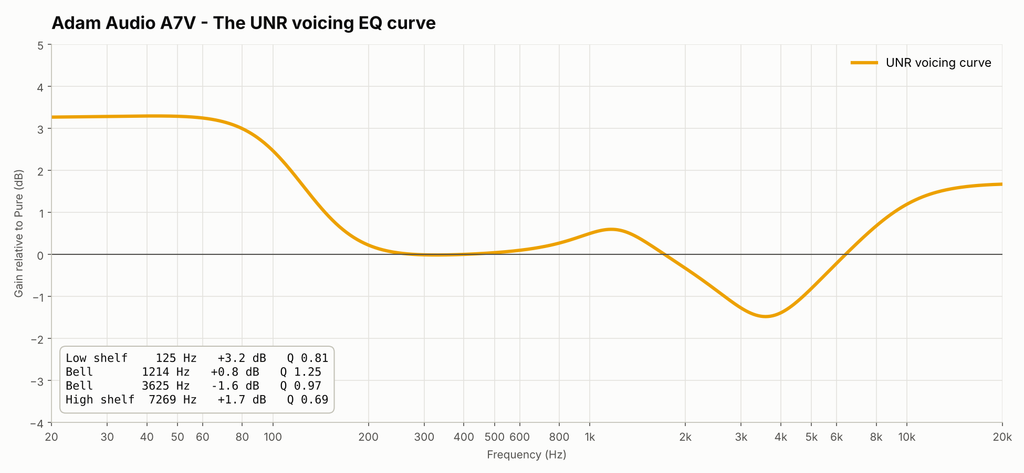
The difference between UNR and Pure voicing, shown as an EQ curve
It’s a listening curve, UNR adds about +3.3 dB below 100 Hz, stays flat from roughly 250 Hz to 800 Hz, has a small bump around 1.2 kHz, scoops about -1.5 dB around 3.5 kHz and adds almost +2 dB above 10 kHz. If you wanted to recreate it on any parametric EQ, these four bands get you within 0.07 dB:
- Low shelf: 125 Hz, +3.2 dB, Q 0.8
- Bell: 1.2 kHz, +0.8 dB, Q 1.25
- Bell: 3.6 kHz, -1.6 dB, Q 1.0
- High shelf: 7.3 kHz, +1.7 dB, Q 0.7
Measuring the tone controls of the A7V
Any speaker you put in a room interacts with the walls, the desk and the acoustics around it, and that changes how it sounds. The A7V has four tone controls on the back to correct for this. The goal is to keep the speaker a flat reference in your room, not to flavor it. That’s what UNR is for.
Each chart below has two panels. The top is my in-room measurement in Pure at every setting of that control. The bottom is the EQ filter from Adam’s published specs, on the same scale. My measurements matched Adam’s filters within about 0.2 dB RMS, so these switches do exactly what Adam says they do.
Adam Audio A7V Bass Control
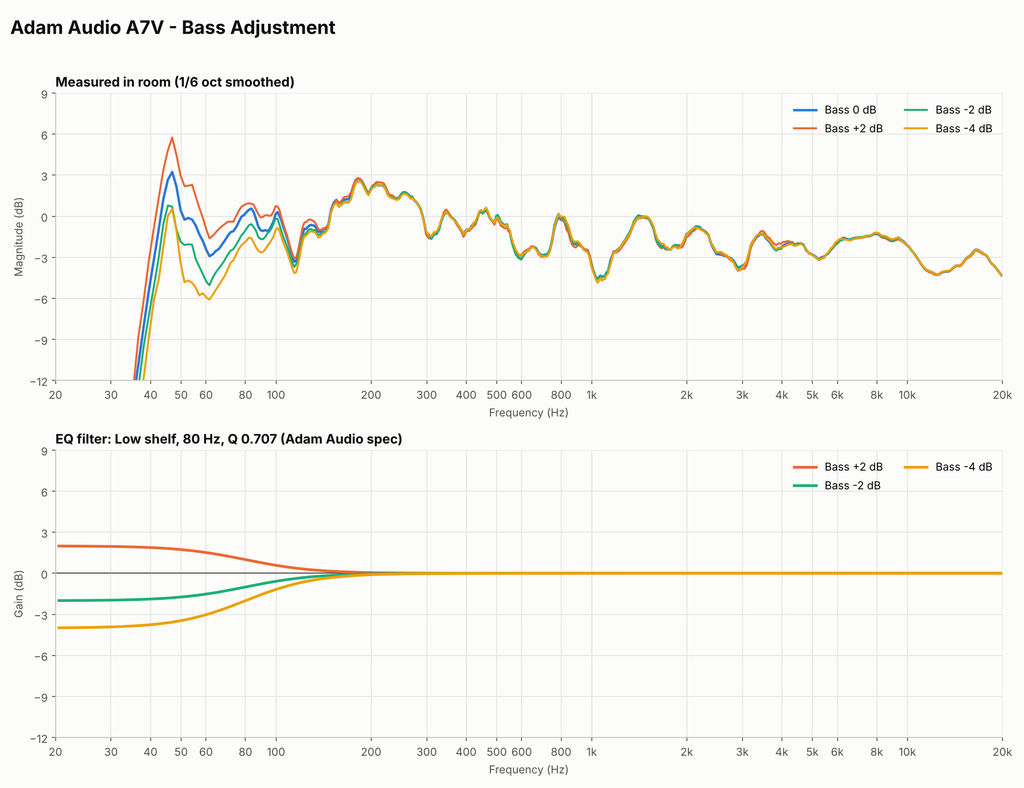
Adam Audio A7V Bass Control: low shelf at 80 Hz, settings of +2, 0, -2 and -4 dB
The shelf is in full effect below about 50 Hz and back to flat by roughly 150 Hz. This is for when the speaker sits close to a wall. Moving a speaker against a wall takes it from half space to quarter space, and the reflections pile up in the low end. That’s actually how Klipsch got so much low end out of some of their classic corner speakers. In my room, the -2 and -4 settings noticeably tamed a room peak at 45 Hz.
Adam Audio A7V Desk Control
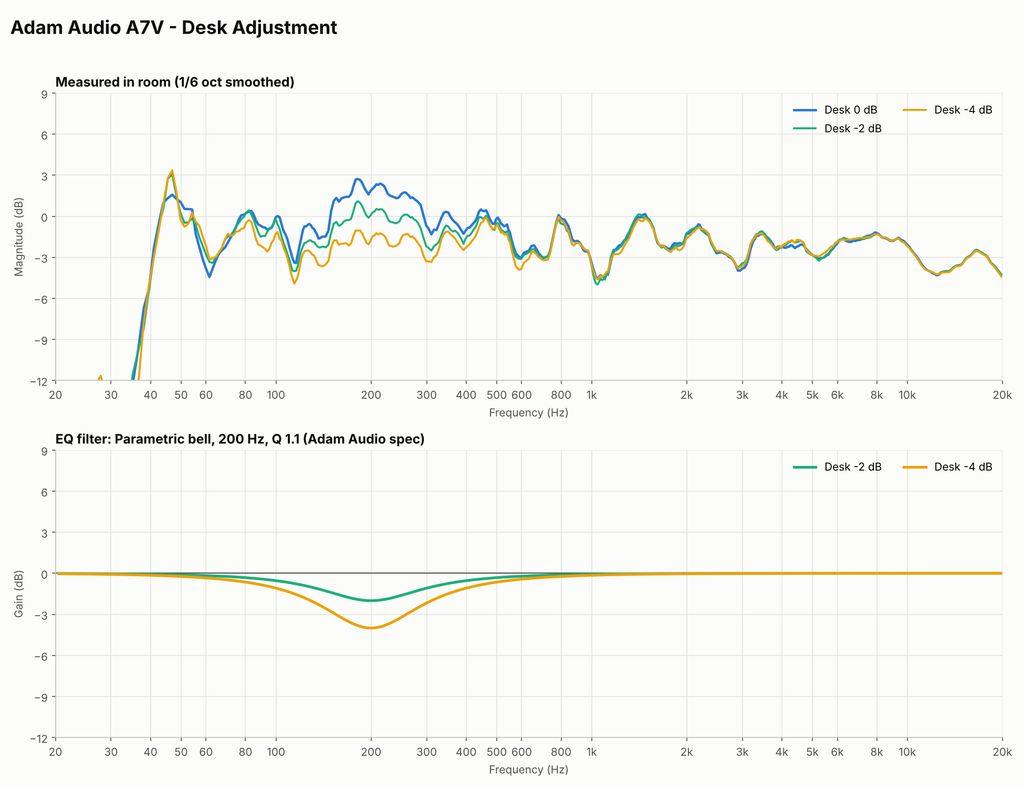
Adam Audio A7V Desk Control: bell at 200 Hz, settings of 0, -2 and -4 dB
A fairly wide bell spanning about 100 Hz to 400 Hz, with nothing happening below 80 Hz. My desk was creating a buildup around 150-250 Hz, and this control flattened it right out. That’s exactly the reflection problem it’s designed for.
Adam Audio A7V Presence Control
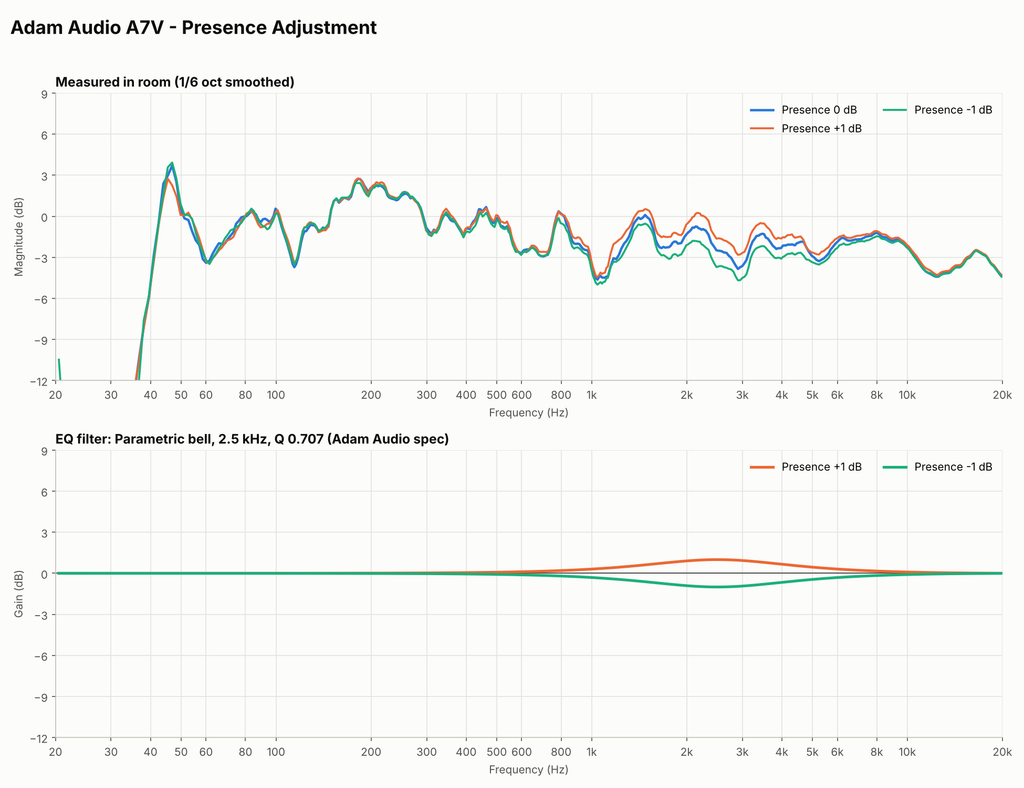
Adam Audio A7V Presence Control: bell at 2.5 kHz, settings of +1, 0 and -1 dB
This one is broad, running from about 1.2 kHz to 6 kHz. It only moves ±1 dB, so it’s a subtle tilt in the upper mids rather than a big change.
Adam Audio A7V Treble Control
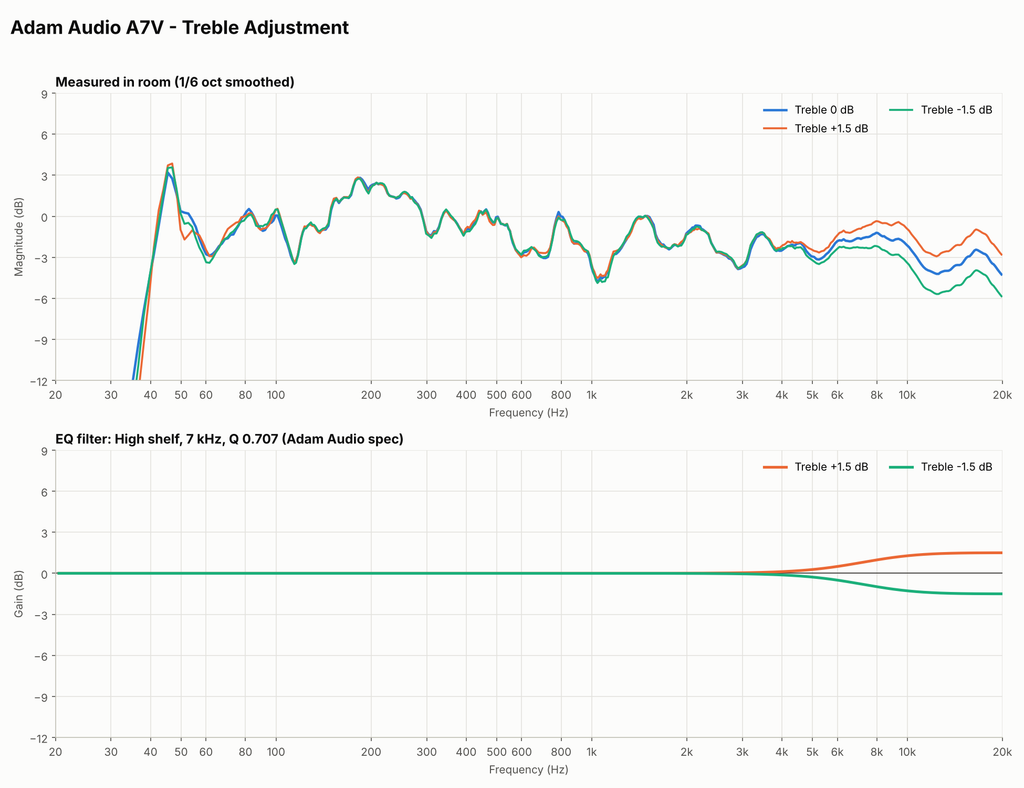
Adam Audio A7V Treble Control: high shelf at 7 kHz, settings of +1.5, 0 and -1.5 dB
The shelf starts rising around 4 kHz and reaches its full ±1.5 dB by about 10 kHz. It’s there to compensate for a room that’s very live or very dead up top.
The full in-room measurement of the A7V
Here’s the raw Smaart transfer function of the A7V in Pure, with the tone controls adjusted to get it as flat as I could in my room.
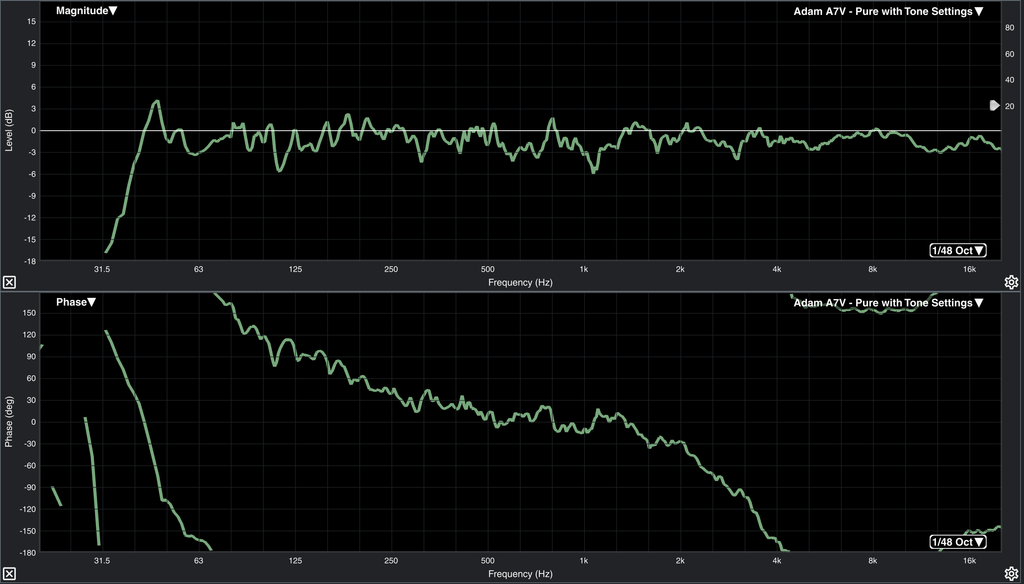
My transfer function measurement, using Rational Acoustics Smaart, of the A7V in Pure voicing with tone controls adjusted for the room, 1/48 octave. Magnitude on top, phase on bottom.
This is a single mic position on my desk, so the ripple you see across the midrange, and the dips around 110 Hz, 1.1 kHz and 2.8 kHz, are reflections off my room and desk, not the speaker. The tone controls can’t fix those. Reflection cancellations take acoustic treatment or moving the speaker. The 45 Hz peak is a room mode, and below about 40 Hz the output drops off steeply, which is normal for a 7 in ported speaker.
I left this at 1/48 octave on purpose so you can see what a real room measurement looks like before smoothing. The tone control charts above use 1/6 octave smoothing, which makes the trends much easier to read. Once you look past the comb filtering, the speaker holds within roughly ±3 dB from about 45 Hz all the way past 20 kHz. For an in-room measurement, that’s insane.
Holding up at volume
Getting a flat response out of a speaker is one thing. Holding it as you turn up is a whole other thing.
Smaller nearfield monitors I reviewed previously had a really impressive response for their size, but it started falling apart around 95 dB. The A7V holds its response well into louder volumes.
I did measure the level knob on the back, which runs from -12 dB to +12 dB with a detent at 0 dB. At -12, 0 and +12, the steps were exact.
SoundID Reference built in
The third voicing, ‘Ext’, is where this speaker gets really interesting. Using Adam’s free A Control software over Ethernet, you can load a Sonarworks SoundID Reference room correction profile directly into the speaker. Once it’s loaded, you don’t need SoundID, A Control or even a computer connected. The correction runs inside the speaker. I’ve reviewed SoundID Reference before, and you can find that video here: [LINK: SoundID Reference video].
You have to be very careful here: in ‘Ext’, the volume knob on the back is bypassed and the speaker sits at 0 dB, so your level has to come from your interface, console or A Control.
Affiliate disclosure: This post contains affiliate links. If you purchase through these links, I may earn a small commission at no extra cost to you. Adam Audio provided the A7V monitors for this review free of charge. All opinions and measurements are my own.