Blackmagic Design just released Fairlight Live at NAB 2026, and it’s generating a lot of buzz. It’s a free, fully-featured software mixer that turns your computer into a broadcast-capable live mixing engine. As of this writing in April 2026, it’s still in public beta, but you can download it now from blackmagicdesign.com.
Blackmagic is well known for their cinema and broadcast cameras like the Pocket Cinema Camera and URSA Broadcast, as well as their ATEM video switchers. For those who don’t dabble in video production, they also make DaVinci Resolve, one of the most popular video editing suites available. Fairlight is the audio engine inside DaVinci Resolve, and this new release takes that audio editing engine and brings it to a live broadcast audio platform.
For live broadcast sound work, one of the first questions I had was about Fairlight Live and the latency that we should expect. How much delay does the software add to your signal path? I ran some tests to find out.
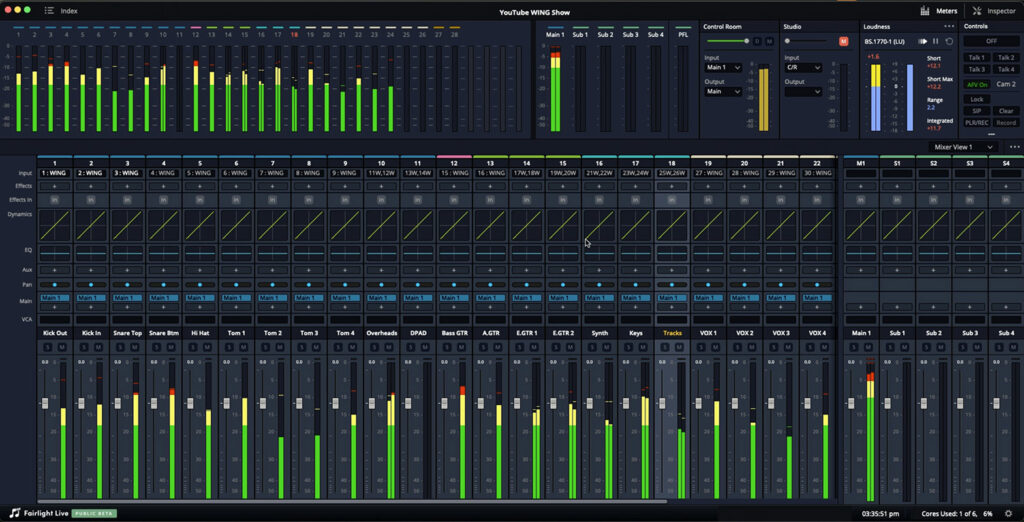
Test Setup
For a lot of churches recently, their broadcast mix is done using a DAW (digital audio workstation) like Reaper, ProTools, or Studio One. Using a DAW like this utilizes an audio console to feed audio into the DAW, mix it inside of the software, then send it back to the audio console for the output feed to hit the stream/broadcast. Fairlight Live works in this same way, however, Blackmagic is claiming that Fairlight Live “easily handles hundreds or even thousands of audio channels.” The actual channel count is all based off of your computer specs as well as the I/O device you have feeding it.
For most churches and venues using Fairlight Live, the channel count is going to be under hundreds of channels. One example I see as a setup is utilizing the USB connection of the Behringer X32 or the Behringer WING. For any audio interface used with Fairlight Live, there is going to be some processing time for the audio to get into the DAW, processed, and then output back to the audio interface.
I tested Blackmagic Fairlight Live on an M2 MacBook using Core Audio with a Behringer WING connected via USB. Everything ran at 48 kHz sample rate and I measured the actual round-trip latency by sending a signal out of the WING, through Fairlight Live, and back in, then comparing it against a reference path.
For comparison, I also tested Reaper and Waves SuperRack Performer using the same hardware, same driver, same sample rate. Waves SuperRack Performer produced numbers nearly identical to Reaper (within a handful of samples), so I’m using Reaper as the comparison point throughout this post. Keep in mind that Waves SuperRack Performer is a plugin host, not a full mixer, so the more direct comparison of Fairlight Live is Reaper.
Fairlight Live Latency Results
When any DAW connects to an audio interface, there’s a sampling of the audio to digitize and interface that audio with the program. This sampling is done in chunks, and those chunks are referred to as the buffer. The buffer number is how many audio samples are processed per chunk. A smaller buffer puts a higher load on the CPU but yields less latency. A larger buffer requires less from the CPU but yields higher latency. The buffer and the sample rate, which is how many samples of audio happen per second, go hand in hand and equate to our latency.
Here are the measured round-trip latencies for Fairlight Live across all available buffer sizes:
| Buffer Size: | Measured Latency: | Fairlight Live Published Latency: |
| 32 | 6.44 ms | 0.7 ms |
| 64 | 8.79 ms | 1.3 ms |
| 128 | 12.94 ms | 2.7 ms |
| 256 | 20.94 ms | 5.3 ms |
| 512 | 36.94 ms | 10.7 ms |
| 1024 | 68.94 ms | 21.3 ms |
| 2048 | 132.94 ms | 42.7 ms |
| 4096 | 260.94 ms | 85.3 ms |
Why the Published Latency from Fairlight Live Looks Different
You’ll notice the “Fairlight Live Published Latency” column shows much lower numbers than what I measured. That’s not a mistake on Blackmagic’s part.
Fairlight Live reports the “Playback Processing Buffer Duration,” which is exactly what the label says: one buffer period. At 48 kHz, a 128-sample buffer takes 2.67 ms, and that’s what Fairlight displays.
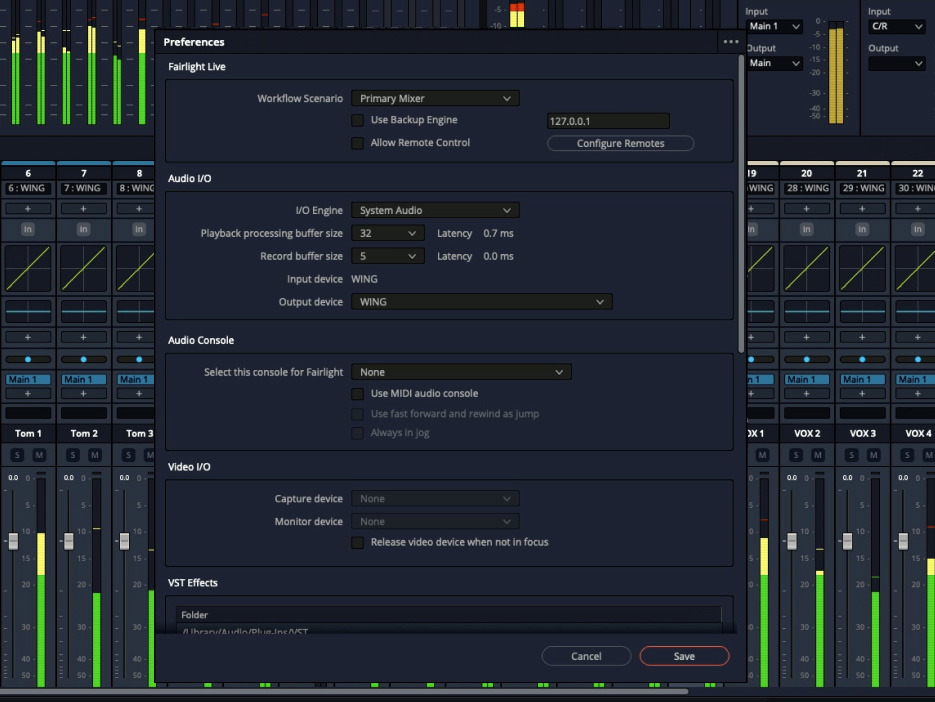
However, the full round-trip latency in and out of the program also includes the input buffer fill time, the output buffer drain time, and the USB transport overhead. These stages exist in any buffered digital audio system, not just Fairlight Live. So the published number is accurate for what it’s measuring, but it’s not the total path latency you’ll experience when using Fairlight Live.
Comparing Fairlight Live Latency to Reaper
Most DAWs will show the Input Latency and the Output Latency. For instance, Reaper says with a buffer of 64 at 48 kHz sample rate, an input latency of 4.5 ms and an output latency of 4.3 ms. Which is interesting because Reaper actually measures faster than the 8.7 ms that it quotes. Here’s how Fairlight Live compares to Reaper at the same buffer sizes:
| Buffer | Reaper Latency | Fairlight Live Latency | Difference |
| 64 | 7.50 ms | 8.79 ms | +1.29 ms |
| 128 | 10.17 ms | 12.94 ms | +2.77 ms |
| 256 | 15.50 ms | 20.94 ms | +5.44 ms |
At buffer 128, Fairlight Live adds about 2.8 ms more latency than Reaper on the same hardware. At buffer 256, the gap widens to about 5.4 ms.
To me, those numbers suggest a design choice as the added latency is exactly one buffer. Here’s what I observed in the measurements.
Understanding the Latency Pattern
When audio goes out of your computer, gets processed, and comes back, there are three stages:
- Input Buffer Fill: The driver collects one buffer’s worth of samples from the interface before handing them to the host application.
- Processing: The host application runs your plugins and routing on that buffer.
- Output Buffer Fill: The processed buffer is sent back out to the interface.
What I Measured in Reaper (2-Buffer Pattern)
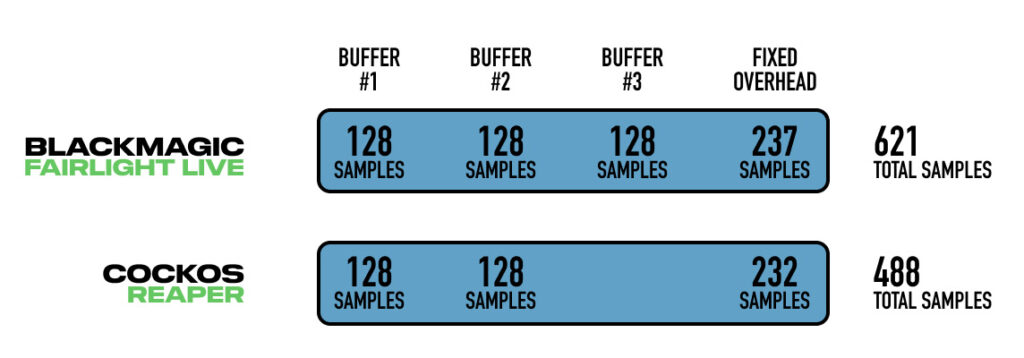
Based on the measured round-trip latency, Reaper behaves as if the audio path requires about two buffer periods plus fixed hardware/driver overhead. The pattern I observed follows a formula of roughly (2 × Buffer) + 232 samples.
That likely means the input, processing, and output stages are being scheduled efficiently enough that the processing stage does not add a full extra buffer period to the measured path.
What I Measured in Fairlight Live (3-Buffer Pattern)
Fairlight Live behaves as if there is one additional buffer period in the path compared with Reaper. The pattern I observed follows a formula of roughly (3 × Buffer) + 237 samples.
That could be an internal processing buffer, a safety buffer, or a different scheduling model. I haven’t confirmed the exact architecture with Blackmagic, but the measured pattern is very consistent.
What This Might Mean
The important thing is not that Fairlight Live is “wrong” or that Reaper is magically bypassing physics. Both systems are working with the same buffer size and the same hardware. The difference is that Reaper measured like a 2-buffer round-trip path plus fixed overhead, while Fairlight Live measured like a 3-buffer round-trip path plus nearly the same fixed overhead. That extra buffer period is what creates the latency gap.
Lower-latency paths generally give the engine less time to finish each block of audio before the next deadline. An extra buffer period can potentially provide more scheduling margin, but I wouldn’t assume that automatically means Fairlight Live can handle more plugins or channels until that’s tested directly.
I haven’t had a chance to run a full comparison with 48 tracks and heavy plugins on both platforms. That’s a test I’d like to do in the future.
A side note, to get Reaper to the same processing level as Fairlight Live, you would need to add an EQ plugin like the Waves eMo Q4 and a dynamics plugin like the Waves eMo D5 as seen below:
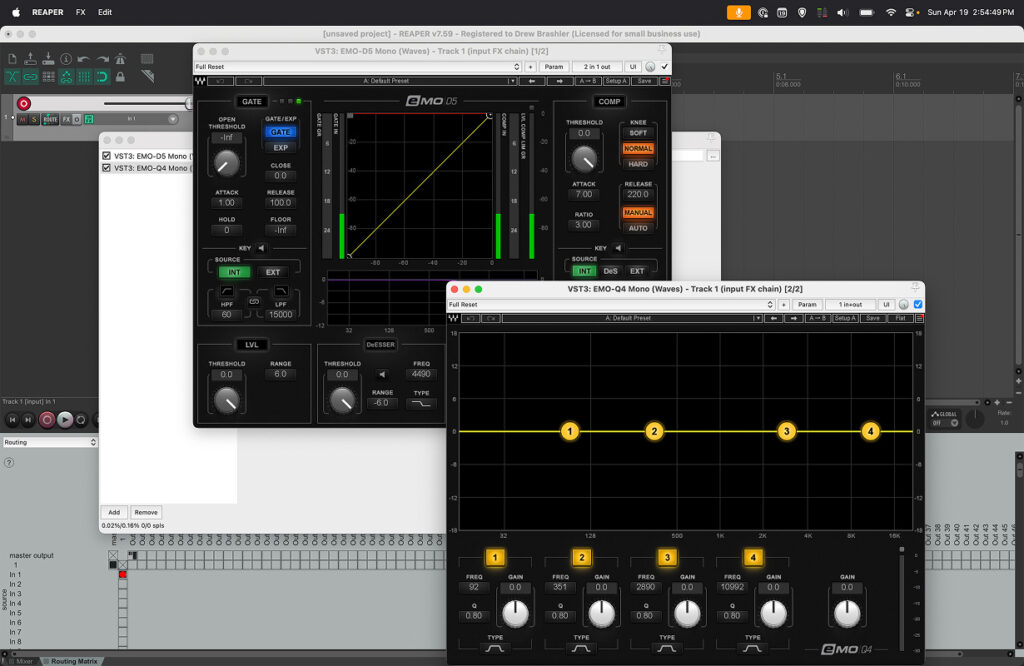
With the extra plugins, you can add more latency, however the Waves eMo Q4 and the Waves eMo D5 both are plugins with 0 samples of latency. In fact Waves publishes their latency here, just look for the Native processing and find the plugin in question, then it is based off of the Sample Rate and listed in samples. For instance the Waves L2 Ultramaximizer has 64 samples of latency or 1.33 ms of added latency.
What This Means for Your Use Case
For broadcast and stream mixing: Buffer 128 at ~13 ms is workable. Most engineers won’t notice this, and video encoding adds far more latency than audio processing anyway. Fairlight Live’s latency is unlikely to be the bottleneck in a broadcast workflow.
For talent monitoring through the software: The latency starts to matter more. At buffer 128, you’re looking at nearly 13 ms of round-trip delay. If you’re sending monitor mixes to talent through Fairlight Live, you’ll want to factor this in. Reaper measured about 10 ms at the same buffer size.
For large shows with heavy processing: It’s possible the extra buffer period provides more processing margin for complex mixes, but I haven’t tested that directly yet.
Final Thoughts
Blackmagic Fairlight Live is an interesting addition to the live audio software space, especially at the price point of free. The latency is higher than Reaper or Waves SuperRack Performer at the same buffer size. I can’t say for certain whether that extra buffer is a dedicated processing buffer, a safety buffer, or simply part of how Fairlight Live schedules audio internally. But the measurement pattern is consistent enough to say that Fairlight Live adds roughly one additional buffer period compared with Reaper on this test system.