NAMM 2026 had a massive show floor, and like every year, the sheer volume of new gear can be overwhelming. So instead of trying to cover everything, I want to walk you through the products that stood out to me – specifically the ones I think matter most for churches running small to medium-sized audio setups.
These are tools I genuinely believe can make your Sunday mornings easier, your audio better, and your team more confident. Some of them solve problems I hear about from church techs every single week, and some of them may solve problems that you don’t even know you have!
Some links in this post are affiliate links, which means I may earn a small commission if you purchase through them at no extra cost to you. I only recommend products I genuinely believe in.
Shure SLX-D+ Wireless Systems
Wireless microphone questions are probably the number one thing I get asked about from churches, and the new Shure SLX-D+ line is going to change a lot of my recommendations.
The main feature is ShowLink Ease, which creates a dedicated Bluetooth LE control link between the receiver and transmitter. Previously this had only been on Shure’s flagship line the Axient Wireless! ShowLink Ease allows you to remotely change transmitter settings (frequency, power level, lock/unlock) all from the receiver or from the Shure Wireless Workbench mobile app.
I watched a demo at the booth where the system detected RF interference and automatically recalculated and switched frequencies. It took about 3-5 seconds to go from audible interference to clean audio. For a church running any amount of wireless, that kind of automatic recovery is huge.
ShowLink Ease and Built-In Features
Every SLX-D+ receiver also ships with Shure’s Digital Feedback Reducer built in. This is similar technology to the standalone DFR units Shure used to make, but now it’s embedded right in the receiver. You can turn it on or off depending on your situation.
The system also includes 138 MHz of wide-tuning range with up to 11 active transmitters in a single 6 MHz TV channel, greater than 118 dB of dynamic range, and just 2.8 ms of latency.
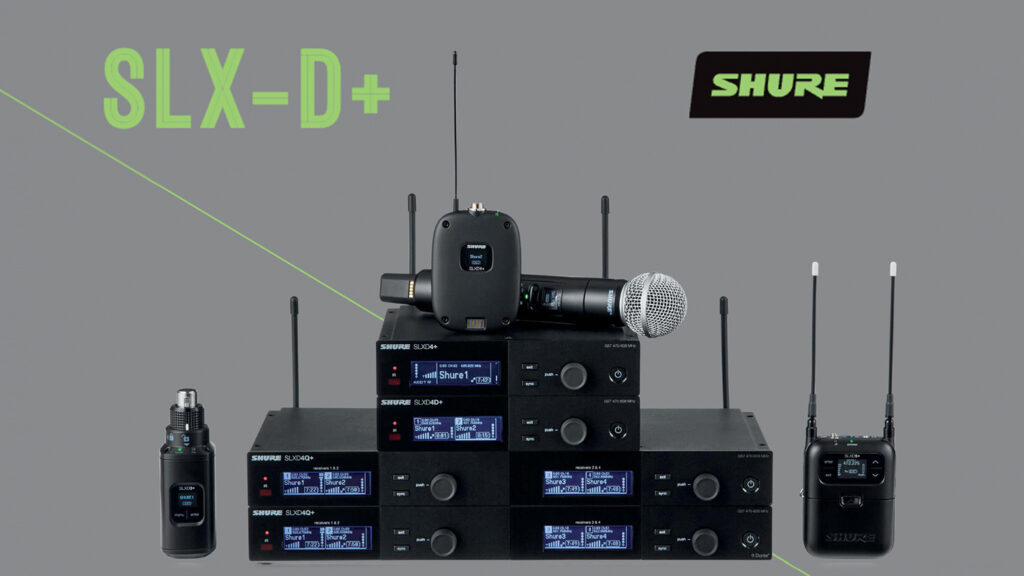
One thing to note for churches planning to grow their wireless count: SLX-D+ fits nicely as the entry point in the Shure ecosystem. In a single 6 MHz TV channel, SLX-D+ handles 11 active transmitters, QLX-D does 15, ULX-D does 17 (47 in high density mode), and Shure Axient does 17 (47 in high density mode).
The cost scales with those numbers – SLX-D+ is the most affordable option while still giving you Shure’s build quality and the new ShowLink Ease management.
System Options and Pricing
Receiver options include half-rack single and dual receivers plus full-rack quad receivers in both standard and Dante versions. The quad receivers (SLXD4Q+ and SLXD4QDAN+) can cascade antennas across up to three quad units without needing a separate antenna distribution system, which saves rack space and budget. This means you can have 12 channels of wireless on one set of antennas. Battery life is up to 8 hours on standard AA batteries.
Here are a few system configurations with pricing to give you a sense of the cost:
- Shure SLXD24+/SM58 Handheld System – $789
- Shure SLXD14+/85M Wireless Lavalier System – $919
- Shure SLXD24D+/SM58 Dual Handheld System – $1,649
If you’re looking at wireless for the first time or upgrading from a budget system, SLX-D+ should be near the top of your list. And if you’re already a Shure SLXD user, the “+” upgrade brings improvements that make wireless easier to manage.
Behringer StageConnect Gets a Major Upgrade
If you’re a WING user, this section is for you.
Behringer quietly made some big moves with StageConnect at NAMM 2026, and I mean quietly. I spotted a looping video on a TV at Behringer’s booth showing a brand new product line, and I was genuinely the only person who noticed it.
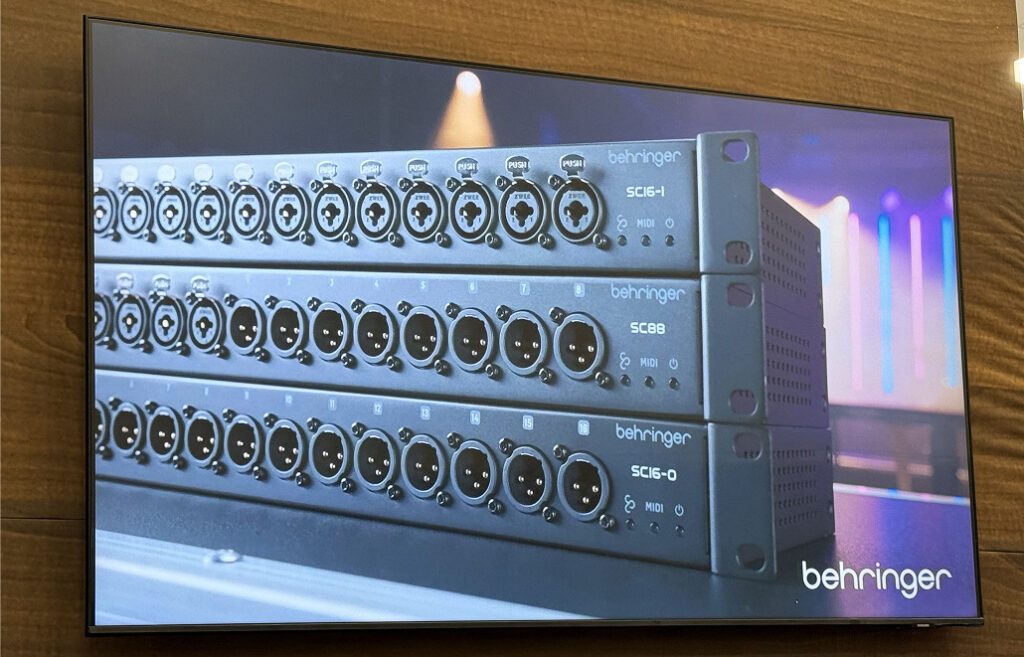
The new Behringer SC line products shown on the TV in the Behringer Booth at NAMM 2026
SC-RE Range Extender
The SC-RE is a StageConnect Range Extender that doubles your maximum cable length from 40 m to 80 m on a 110 ohm cable. The setup is straightforward: WING to 40 m of cable, then the SC-RE, then another 40 m of cable to your StageConnect device. You can only have one SC-RE in a single StageConnect chain, but if you’re running a P24 Hub, you could put an SC-RE on each of the front ports for separate extended runs.
No pricing yet, but this will solve a real limitation for larger rooms and stages.
The All-New Behringer SC Line
This is the exciting part. Behringer showed a completely new StageConnect product line that mirrors the Klark Teknik and Midas DN4816 devices most WING users are already familiar with, but with a few major upgrades – USB-C and MIDI on the SC-U and possible MIC inputs on the SC16-I and SC88.
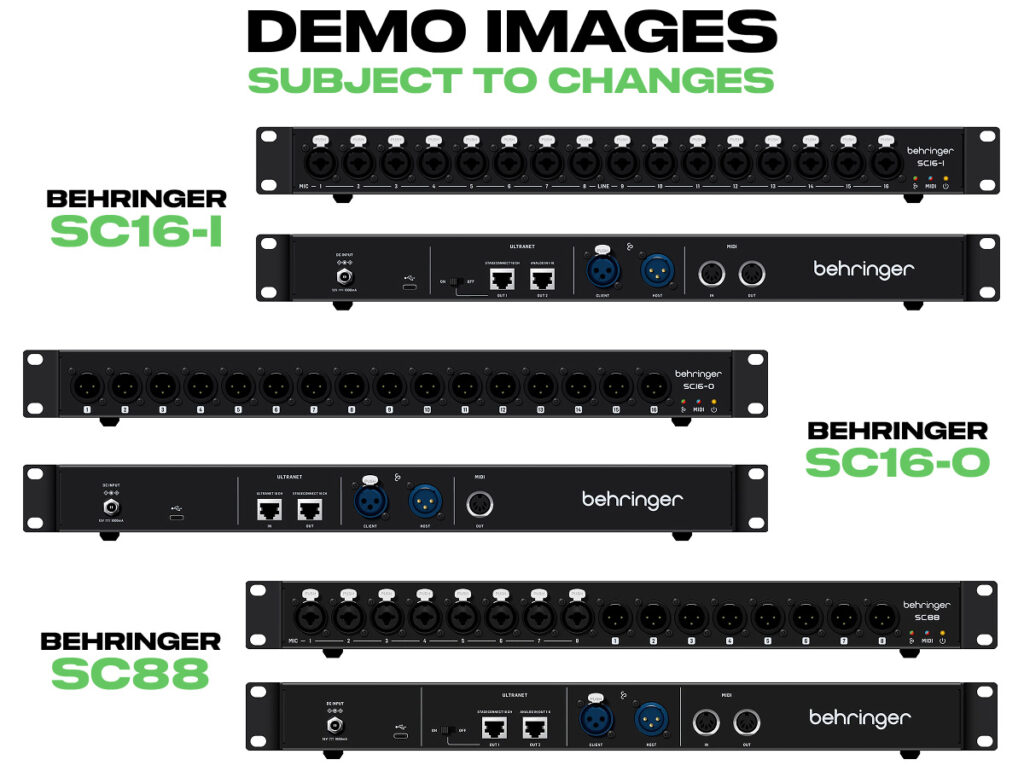
Demo Images of the Behringer SC16-I Behringer SC16-O and Behringer SC88 (Demo Image, subject to change)
The lineup includes the SC16-I (16 inputs, similar to the DN4816-I), the SC16-O (16 outputs, similar to the DN4816-O), the SC88 (8 in / 8 out, similar to the DN4888), and the SC-U (USB audio interface with USB-C instead of the DN4816-U‘s USB-B).
All of the new SC devices have MIDI ports, which means we should eventually be able to send and receive MIDI over StageConnect from the WING. That opens the door for controlling external gear, triggering lighting cues, or integrating with other MIDI-capable hardware – all over the same StageConnect connection.
Behringer did have the SC-U and the SC-RE physically at the show, and I also was graced with some demo images of the SC16-I, SC16-O, and SC88 from Behringer. The back panels show fewer switches than the Klark Teknik equivalents, which I appreciate – some of those switches were confusing. But what you will notice in these demo images is inputs 1-8 on the SC16-I and the SC88 both have MIC written on the label.
Remember this was a soft launch, so details are still limited. But with the Flow 4V and Flow 4VIO having mic inputs, I think we will see similar hardware in these new StageConnect devices.
What’s Next for StageConnect
Between the new SC line, the SC-RE range extender, and the Flow 4V/4VIO products, Behringer is clearly investing heavily in the StageConnect ecosystem. I have a feeling there are WING firmware updates coming that will unlock even more capability with this new line, and I’ll be covering the updates as they happen.
For a deeper dive on StageConnect and how all of these devices connect, check out my complete StageConnect guide.
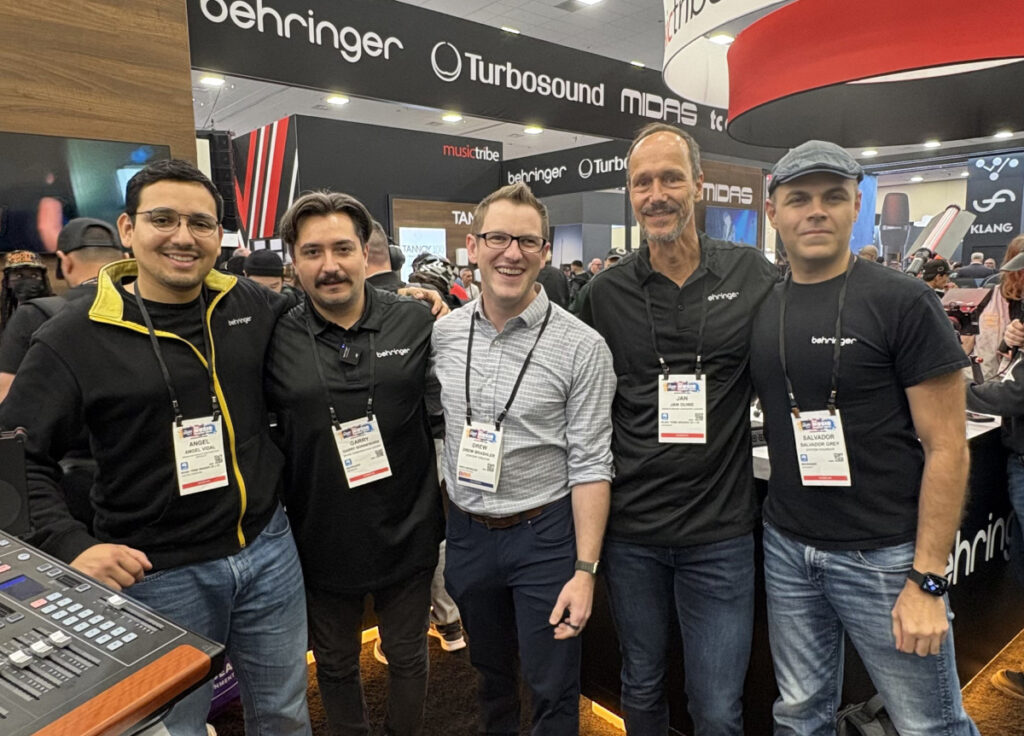
With the Behringer team at NAMM 2026
Mixing Station Anywhere & BoxCast
This is one of those products where I immediately thought This is going to change how multi-campus churches handle audio.
Mixing Station Anywhere is a collaboration between BoxCast and Mixing Station that lets you control a digital mixing console remotely, in real time, from anywhere with an internet connection. It works with over 60 mixers across brands like Behringer, Midas, Yamaha, Allen & Heath, PreSonus, Soundcraft, and more. That means if your church runs an X32, a WING, or really any of the major digital consoles, this works for you.
Setting It Up
The easiest way to set this up is with the BoxCast Spark encoder, which is a plug-and-play hardware solution.
Typically the Spark encoder is for a streaming platform for streaming your online services, but the Mixing Station Agent is built right into the firmware, so you don’t need an extra computer running at the venue. Just connect the Spark to your network and your console, and you’re ready for remote access.
The Spark also has an HDMI input, which turned out to be incredibly useful during the demo. You can point a camera at the stage so your remote engineer can see what’s happening, or do a top-down shot of the mixer surface. Seeing the stage is probably more helpful in most situations, but either way, that video context makes remote mixing more practical.
There’s also a software-only option if you don’t want to invest in the Spark hardware. You can download the Mixing Station Agent for free and run it on a PC or Mac at the venue. The catch is that computer has to stay on and connected during the entire event.
Either way, you’ll need a Mixing Station subscription (around $10 /month) to enable the “Anywhere” cloud features that make remote access work.
How It Performed
I got to try this at the booth, and let me tell you, they intentionally made the demo difficult. They routed the control signal from a computer on the show floor in California, through a server on the East Coast to introduce maximum latency, and then back to the Spark encoder in California. All of this, mind you, running on shared convention center internet that maxed out at about 5 Mbps.
Even with all of that, control latency was right around the quoted 50-200 ms range, and audio/video preview was about 1 second. With a solid internet connection on both sides, that latency drops below 1 second for audio & video preview.
Real-World Use Cases
You can give a remote engineer access to the full channel strip and FOH mix, or you can lock it down to just a specific mixbus for your online broadcast. Here are some scenarios where this could be a game-changer:
- A more experienced engineer can remotely log in to help a newer volunteer during a tricky service
- A dedicated broadcast engineer can mix your livestream audio from a quiet room or even from home
- Multi-campus churches can have one experienced audio person supporting multiple locations
- You can set up a “broadcast booth” in a different part of the building with any audio interface and a pair of near-field monitors or IEMs
If your team uses something like Planning Center and the run of show is documented, a sub 1-second audio latency on the preview isn’t going to cause problems. You know what’s coming next in the service, so you can stay ahead of it.
Rational Acoustics Smaart RTA Mobile App
If you’ve never used a measurement tool to look at what your PA system is actually doing in your room, the Smaart RTA app is one of the easiest ways to start.
This is Rational Acoustics’ professional-grade RTA engine, which is the same algorithms used in their desktop Smaart Suite software that professionals use to tune concert PA systems worldwide, but running on your iPhone or iPad (iOS 15 or later).
You get a Real Time Analyzer, a spectrograph (frequency over time with color-coded amplitude), and an SPL meter.
Why I Use It
I have been using Rational Acoustics Smaart for years.
My personal favorite thing about this app is how easy it makes it to find feedback frequencies. Whenever I’m ringing out a floor wedge or a microphone, I grab my phone, open Smaart RTA, and cause the mic to feedback. With the 1/48th octave banding, I can see the exact frequency that’s ringing.
You can also switch to 1/3rd octave, which lines up perfectly with a standard 31-band graphic EQ. Additionally, the spectrograph view is incredibly useful for catching intermittent issues, if you think you heard feedback during a service, you can look back through the spectrograph history to see if there was a straight line at a specific frequency. Then you know exactly where to listen and what to address.
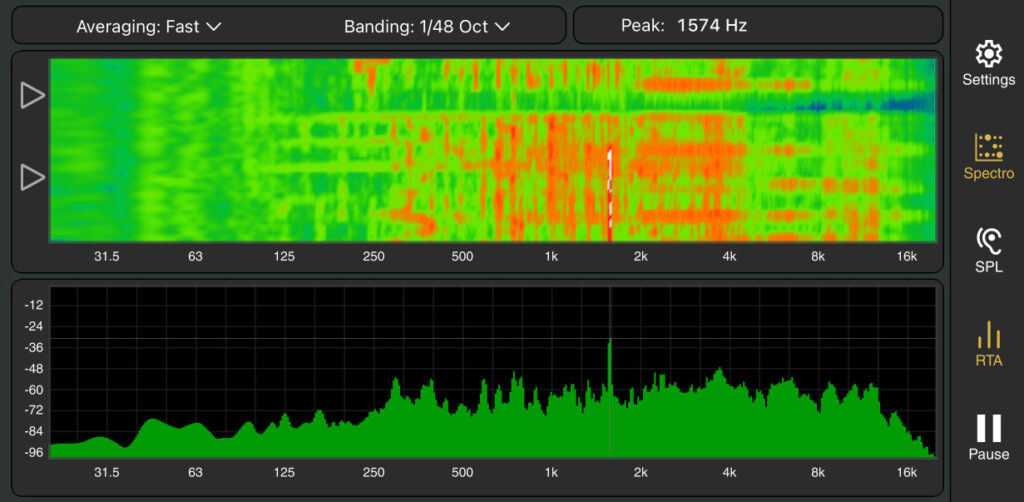
Your iPhone’s built-in microphone is reliable enough for frequency response and most SPL measurements. You can walk around your room during rehearsal and see how your PA coverage varies by location, identify problem frequencies, and compare week to week.
For accurate SPL readings at louder levels, you’ll want an external measurement mic (the Pro tier supports external microphones via USB-C or Lightning).
Pricing and Getting Started
The base tier starts at $1.99 /month (or $59.99 lifetime) and includes the RTA, spectrograph, and SPL meter. There’s also a Pro tier with additional features like external mic support and data capture.
I have more Smaart content planned for the coming months, including an introduction to Smaart for church techs and a guide on tuning your PA with Smaart. For now, if you’ve been wanting to understand what your room actually sounds like, this app is the place to start.
Check out Smaart RTA on the App Store or visit Rational Acoustics’ product page for more details.
Alclair In-Ear Monitors
I’ve been wearing my Alclair RSM Quad custom IEMs since 2018. If you’ve watched any of my YouTube videos, those are the IEMs you see me wearing.
At NAMM 2026, Alclair had their full lineup on display, including 13 custom IEM models and 3 universal-fit options. I got to listen to all three universals and all 13 custom IEM models. One of my largest frustrations with universal IEMs is that most of them don’t sound very good. Noise isolation is poor and the sound is uninspiring.
I wanted to highlight Alclair’s universals because they perform really well and they’re a practical, affordable option for churches.
The UV1 ($149) is a single-driver universal that has a very even frequency response. The UV2 ($199, currently on sale from $299) is a dual-driver with a balanced sound signature and a slight low-end emphasis that gives it energy without being colored. The UV3 ($399) is a triple-driver with more low-end power, making it great for drummers and bassists who need that extra push.
For a front-of-house engineer who doesn’t want to invest in customs (or needs a backup set), the UV2 is my recommendation. The sound is balanced and even, which is exactly what you want when you’re making mix decisions. And for churches with rotating volunteers, universals make a lot of sense – you can keep a few sets in a drawer and hand them out as needed.
Digital Audio Labs DPM2 and DPM4
Digital Audio Labs showed their new DPM2 and DPM4 at NAMM 2026 – belt-pack sized Dante personal mixers with 2 and 4 channels respectively. Both run up to 96 kHz, receive power over Ethernet (PoE), and include premade EQ curves for inputs to help musicians dial in their sound quickly.
These aren’t trying to replace a full personal monitoring system like the Behringer P16-M or the Livemix. At $349 for the DPM2 and $399 for the DPM4, they’re great for situations where you don’t need a ton of channels – like a video director who just needs to monitor the stream mix coming off Dante from your WING or X32, or a musician who mainly needs a “me” channel and an “everything else” channel with maybe a click track.
The DPM4 gives you enough flexibility for setups like four individual channels, two stereo channels, or a stereo “everything mix” plus individual channels for specific instruments. These are an affordable way to put personal monitoring in one or two extra positions without investing in a full system.
DiGiCo DiGiVoice: Accessibility Comes to Live Sound
This caught my eye because it solves a problem most of us never think about – one that didn’t really exist until consoles went digital. Back when everything was analog, an engineer could feel where a knob was set just by touching it. You could reach over, grab an EQ, and know exactly where it was by feel alone. Digital consoles changed that. Encoders all feel the same regardless of the value, and almost every parameter lives behind a screen.
DiGiCo partnered with the Audio Accessibility Alliance (AAA) to develop DiGiVoice, an accessibility software layer that gives blind and visually impaired engineers audio feedback when they interact with a mixing console. I got to try it on a DiGiCo Quantum 112, and the experience was something I won’t forget.
When you touch a fader, the system immediately speaks the channel name and the current value. Touch the mute button, and it says the channel name followed by the mute status, “Pastor, mute off.” That first press doesn’t actually mute the channel, it’s just telling you where you are on the console. Press it again to confirm, “Pastor, mute on.” The response time was fast, even running through a Bluetooth speaker for the demo.
Why DiGiVoice Matters
This one hits home for me personally. I’m blind in my left eye, and while that’s a different challenge than what fully blind engineers face, it gives me a real appreciation for how inaccessible mixing consoles can be for anyone with visual impairment.
The fact that DiGiCo made DiGiVoice open source means any other console manufacturer can adopt the same standards, which makes this truly significant.
Right now, you’ll need a DiGiCo Quantum series console to use DiGiVoice. But the open-source nature means this could eventually show up on other platforms. I’ll be keeping a close eye on this and will share updates as other manufacturers get involved.
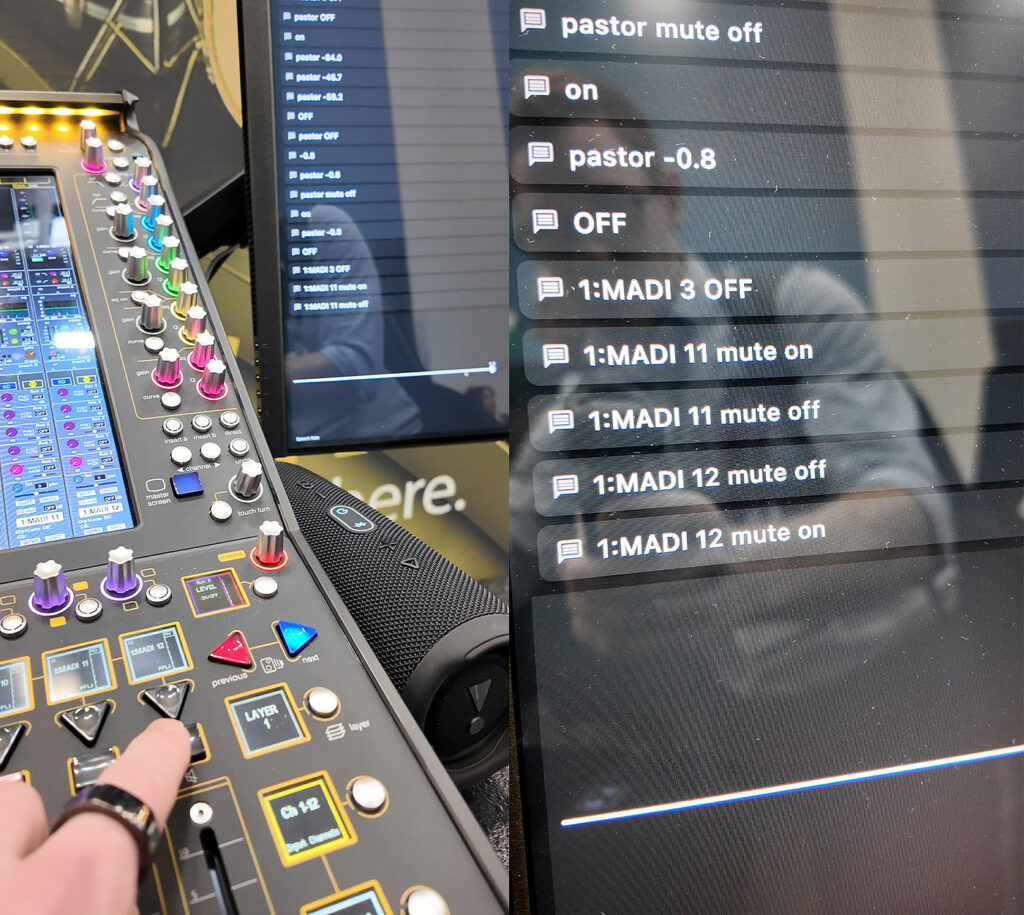
Trying DiGiVoice on a DiGiCo Quantum 112 at NAMM 2026
Wrapping Up
NAMM 2026 had a lot of great gear on the show floor, but these were the products that genuinely excited me for the audio teams I work with every day.
Whether it’s smarter wireless management with the Shure SLX-D+, the expanding StageConnect ecosystem from Behringer, remote mixing becoming a reality with Mixing Station Anywhere, or the industry taking its first real steps toward accessibility with DiGiVoice, it’s a great time to be running audio.
I’ll be covering several of these products in more depth in upcoming videos and blog posts, so make sure you’re subscribed to the newsletter and YouTube channel so you don’t miss anything.