If your church PA system isn’t performing the way it used to, you’re facing a decision that a lot of churches struggle with: do you replace the whole thing, or is there a better option?
A few years ago, I was working at a church in Texas where the PA had become a constant source of frustration. Feedback on vocals and the pastor, poor stereo imaging, and coverage that didn’t match the room anymore. The easy answer would have been to rip it out and start fresh with a new system. But that’s not always the right call.
Here’s the story of how we diagnosed the real problems, what we found when we brought the PA down for inspection, and how we made the decision to redeploy rather than replace.
The Problem: When Your Room Changes But Your PA Doesn’t
The Avenue Church in Waxahachie, Texas had a Meyer M1D line array with 12 boxes per side and 6 M1D subs. When the system was originally installed, the PA placement was correct for the room. But then something changed.
The church extended the stage forward, adding a rounded section at the front. This meant the pastor’s teaching position and the vocalists were now standing in front of the PA instead of behind it.
If you’ve ever had a singer with a mic standing in front of your main PA, you know exactly what happens: feedback. Constant, frustrating feedback. Every time I pushed the vocals to where I wanted them, I’d hit a feedback point. The pastor on a headset or handheld for announcements? Same problem.
But that wasn’t the only issue.
Too Wide, Too High, Too Far Back
When I looked at the PA placement with fresh eyes, four problems became obvious:
PA Problem #1: Too Wide
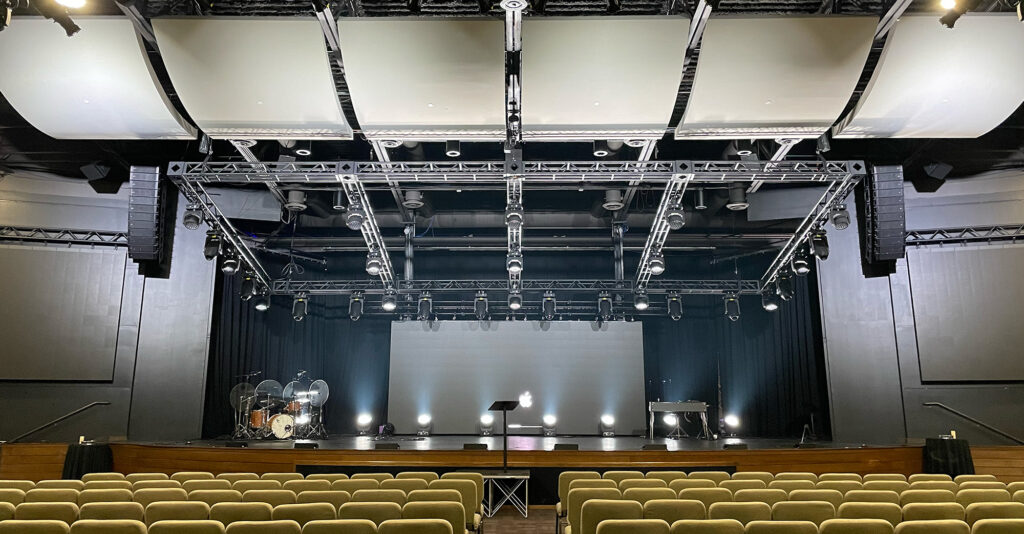
The arrays were hung so far apart that only people sitting dead center got a proper stereo image. Anyone sitting off-center was only hearing one side. That’s not stereo, that’s just loud on one side. It also pushed the sweet spot of the stereo image farther back in the audience depth, but the room itself was fairly short in distance. So it didn’t make sense.
PA Problem #2: Too High
The top boxes were firing directly into a decorative sound cloud, a hard surface that was bouncing energy right back onto the stage. More fuel for feedback.
PA Problem #3: Too Far Back
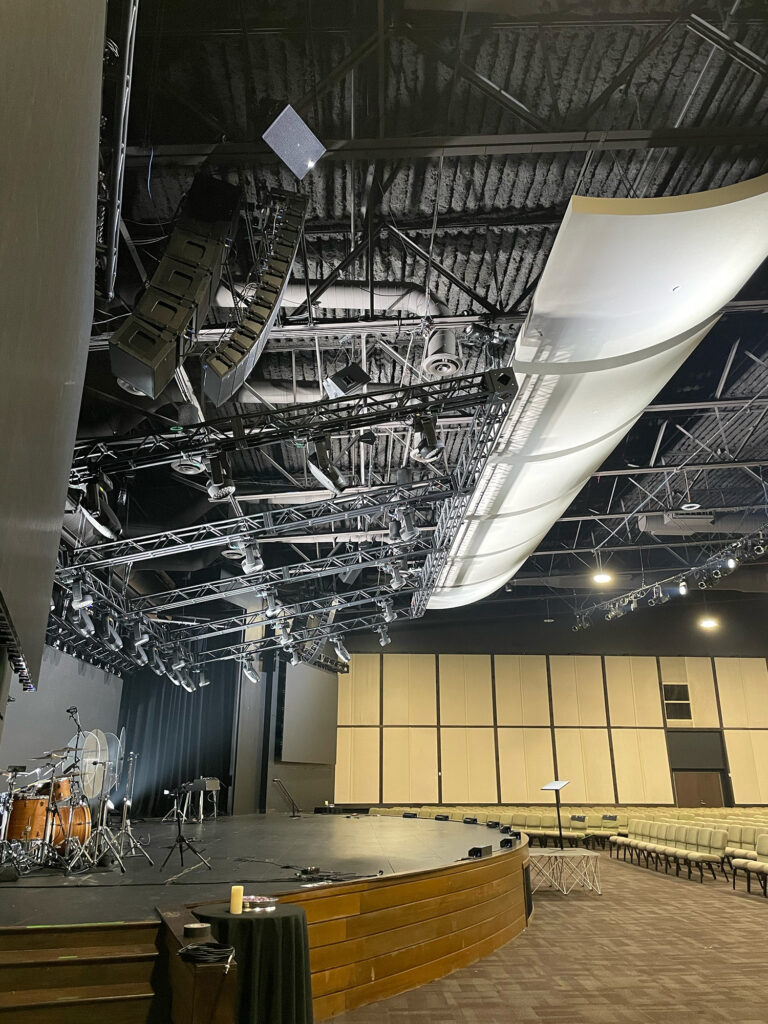
With the stage extension, the PA was now significantly upstage of where performers stood. The coverage pattern was designed for a room layout that no longer existed. Note how far the speakers are from the front edge of the extended stage.
PA Problem #4: Too Many Speakers
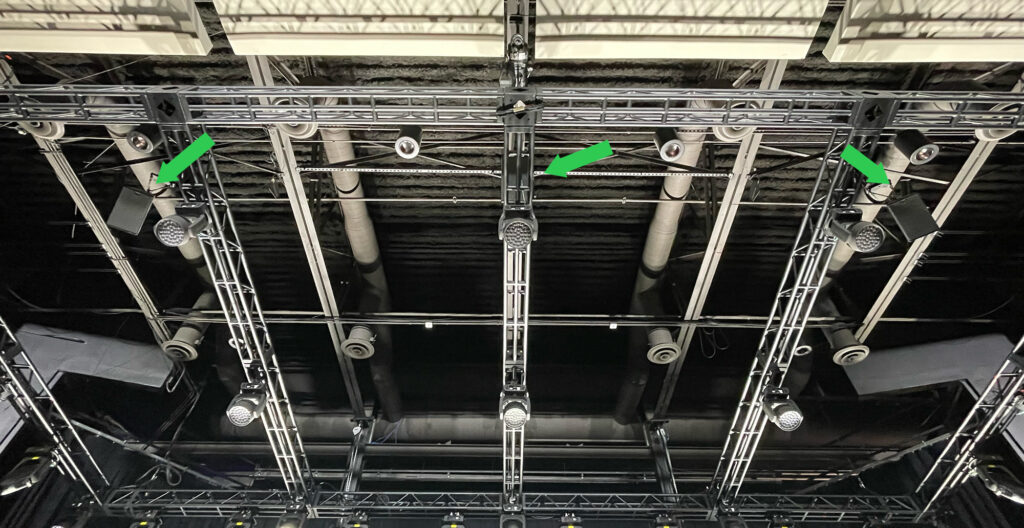
The other problem is that there were too many speakers covering the same section, making it so that multiple speakers would be heard at slightly different times yielding a very bad sounding audio coverage in that spot. The image above is taken from the front row center. You can see that all three of these speakers were covering the same spot. All three of the speakers also had the same audio feed, so there wasn’t a way to control them independently of each other. The other issue is that those speakers also covered the front of the stage where my Pastor and Lead Singers stood.
Using Smaart to Diagnose the Real Problem
I set up Smaart to measure what was actually happening at different positions in the room. The results confirmed what my ears were telling me and showed me exactly which frequencies were causing the feedback.
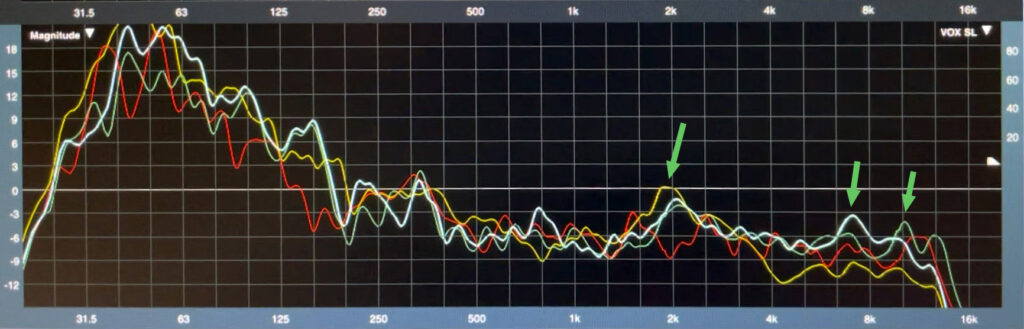
Smaart measurements comparing front of house (red) to stage positions. Notice the significant peaks at 2 kHz and 7-8 kHz on stage.
The red line shows what front of house was receiving, a reasonably flat response. The other traces show measurements from center stage, stage left, and stage right.
See that big peak around 2 kHz? That was my primary feedback frequency on vocals. Every time I pushed a vocal mic hot, that’s where it would ring. The stage left position also showed a massive bump at 7-8 kHz, another feedback point I was constantly fighting.
This data told me something important: the problem wasn’t the PA itself. The PA was working fine. The problem was that the PA was putting too much energy onto the stage relative to the house. Moving the PA forward and adjusting the aim would solve this without replacing a single speaker.
The Decision: Move, Repair, or Replace?
With a PA this old (date codes showed components from 2005, nearly 17 years at the time), replacing the system was definitely on the table. Here’s how I thought through the decision:
Reasons to replace:
- Aging components that could fail
- Newer systems with better pattern control
- Opportunity to design the PA size for the room
Reasons to redeploy instead:
- The PA still had usable life left
- A new PA for this room size would be a major investment
- The church was planning a future expansion that would change the room again
- The core problem was positioning, not the speakers themselves
We decided to redeploy. Move the PA forward, bring it down in height to get under the sound cloud, narrow the stereo width, and remove the problematic center fill that was blasting energy right at the pastor’s position.
What We Found When We Brought It Down
This is where it got interesting, and where the “repair” part of the equation came in.
Once we had all the speakers on the ground, we tested every single box with Smaart. And we found problems we didn’t know existed.
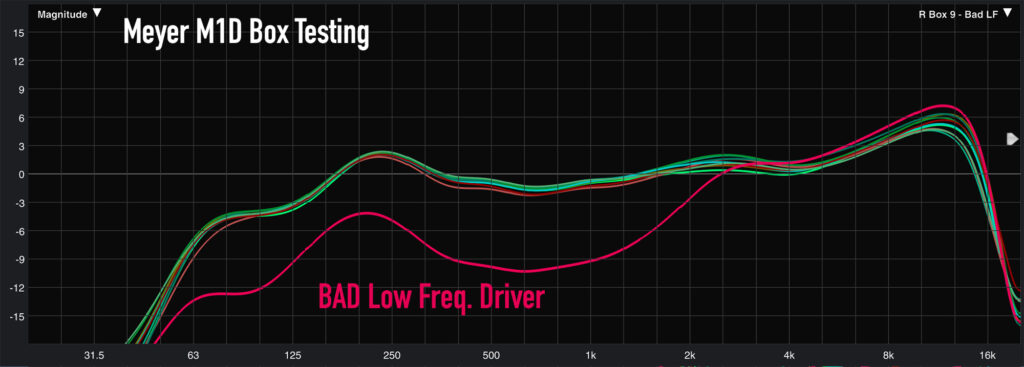
Smaart measurements of individual speakers. The smooth curve is a healthy box. Notice the red trace showing missing low frequency response (bad woofer).
Some tweeters were blown. Some amplifiers had failed. Some woofers weren’t producing output. These boxes had been hanging in the air, part of the system, contributing nothing. Or worse, contributing a degraded signal.
But here’s the really interesting discovery: some boxes that were working fine before we brought them down failed to power back on.
The PA had been wired directly to a circuit breaker with no switch. It had been running continuously for years, literally never turned off unless there was a power outage. When we disconnected power and reconnected it, several power supplies couldn’t handle the inrush current of a cold start. They had been running on borrowed time.
We started with 12 boxes of Meyer M1D and 6 boxes of Meyer M1D Sub per side. After testing, we ended up with 10 healthy boxes of M1D per side and 5 boxes of M1D Sub – still plenty for the room, but a reminder that old gear can have hidden failures you won’t find until you actually test it.
The Result: New Life from an Old System
After the redeployment:
- Feedback reduced dramatically. The PA was now in front of performers, not behind them.
- Stereo imaging improved. Narrowing the arrays meant more seats got a proper stereo experience.
- Coverage matched the room. Adjusted curvature and height put sound where people sat, not into the ceiling.
- Center fill removed. No more energy blasting directly at the pastor’s position.
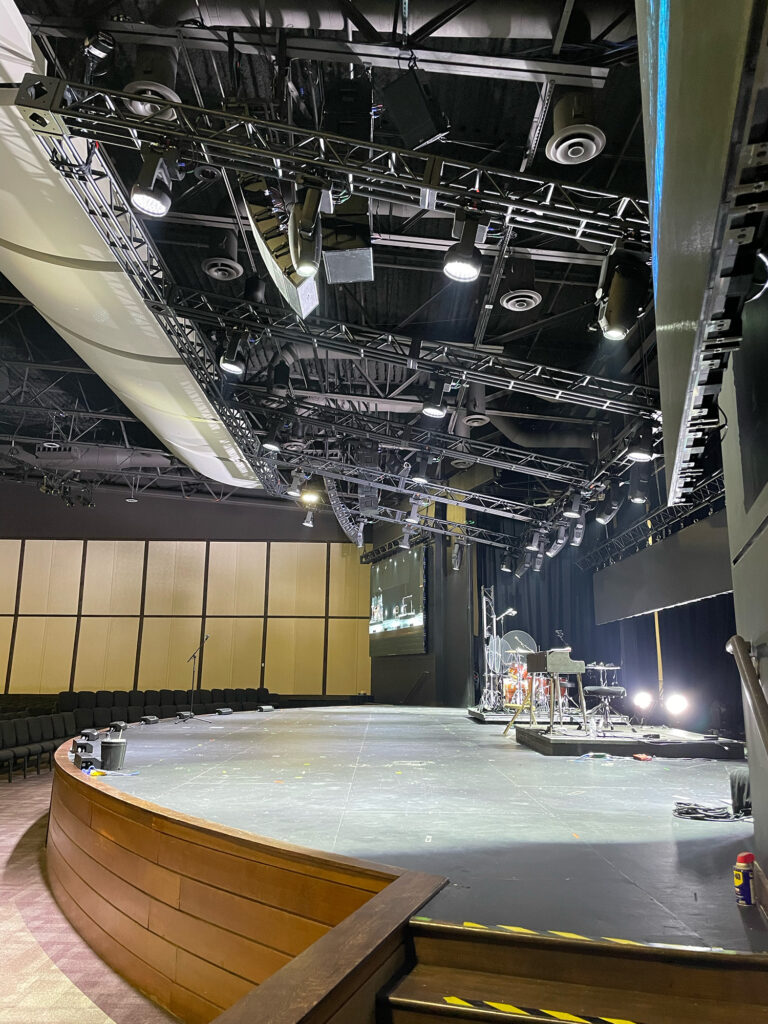
New PA position, moved forward, lowered, and narrowed for proper coverage.
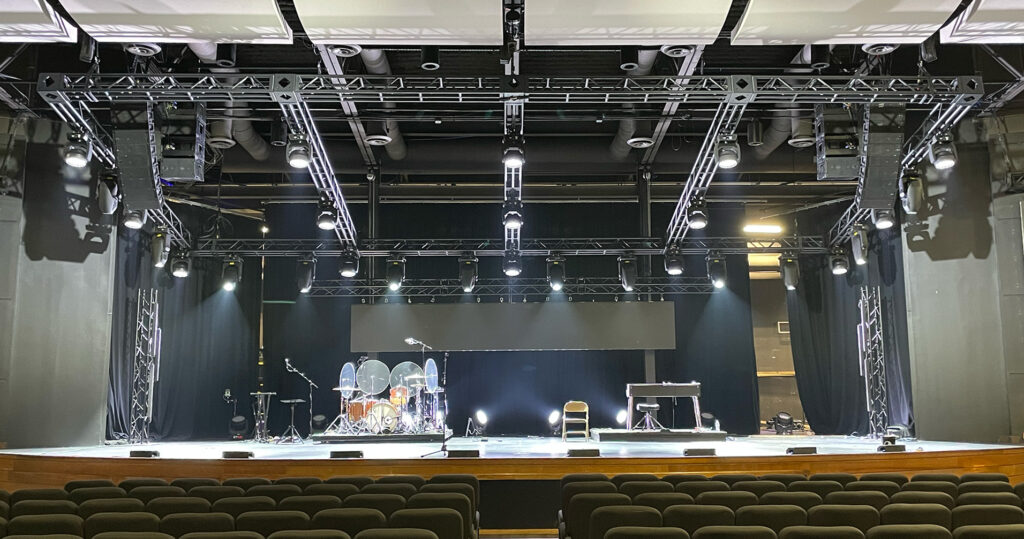
There were some difficulties that we ran into when rigging the system in the new position. There was some electrical conduit that prevented us from putting the PA in the perfect spot. The result was still great and far better than the original position.
The room sounded better than it had in years, and the church saved the cost of a full PA replacement. When they eventually did their expansion and rebuilt the room, they invested in a new system. But this redeployment bought the church several more years of solid performance while they planned for the room expansion.
A Critical Note on Safety and Liability
I need to be very direct about something: if you’re considering moving a hung PA system, please do not attempt this as a DIY project.
I’ve been rigging and hanging speakers for years. I know how to wrap steel correctly. I know the hardware. Even with that experience, I hired a professional integration company to do the physical work, and I brought in a structural engineer to verify the new rigging points. For the integration company I hired E2I Design who I have used a lot in the past with other churches. Evan and his team did great work and I trusted him with helping to redeploy this system.
Here’s why this matters:
Structural limits: The ceiling structure has load ratings that vary by location. Moving a PA from one set of beams to another isn’t as simple as relocating the unistrut. The new position needs to be verified by someone qualified to assess the structure.
Manufacturer specifications: Even manufacturer-provided rigging hardware has installation requirements and weight limits. These need to be followed exactly and verified by qualified personnel.
Liability: If a speaker falls and injures someone, the liability question will be “who installed this and were they qualified?” That’s not a question you want to answer with “we did it ourselves.”
I always recommend consulting both a structural engineer and a system integrator who carries proper insurance and has training in rigging. The cost of doing it right is insignificant compared to the risk of doing it wrong.
How to Think Through This Decision for Your Church
If your PA isn’t performing well, here’s a framework for deciding what to do:
Consider redeployment if:
- The room has changed (stage moved, seating reconfigured, walls added, balcony added)
- The PA position no longer matches the coverage needs
- The speakers themselves still produce clean output when tested
- Budget is limited and the speakers have life left
- Future changes to the room are planned
Consider repair if:
- Testing reveals failed components (amps, drivers, power supplies)
- The system is worth maintaining (quality brand, good coverage design)
- Replacement parts are still available
- The number of failed components is manageable
Consider replacement if:
- Multiple components have failed beyond practical repair
- The technology is obsolete (no parts available, no service support)
- The room has changed so dramatically that the existing system can’t be made to work
- The system was undersized or wrong for the room from the start
- Volume output of the PA is too low for current requirements of the church (moved from speaking/choir only to having a worship band)
- Budget allows for an upgrade that will serve the church for years
Often, the answer is a combination. We redeployed and repaired: moved the PA to the right position and replaced the components that had failed. That gave the church a functional system at a fraction of replacement cost.
When to Bring in Help
If your church is facing this decision, I’d encourage you to bring in a qualified system designer and integrator to assess your situation. They can measure your current system, identify what’s working and what isn’t, and give you honest options for moving forward.
A good integrator will tell you if redeployment makes sense or if you’re better off investing in something new. They’ll also handle the rigging safely and ensure everything is done to code.
YouTube Video
If you want to see some of this redeployment in action, check out the video that I made during the reinstall.