If you’ve ever wondered why your guitar cable looks different from an XLR microphone cable, or why running a long instrument cable picks up buzz while your mic cable stays clean, the answer comes down to balanced vs unbalanced audio connections.
Understanding the difference between balanced and unbalanced audio is important for getting clean sound in any live audio setup. In this guide, I’ll explain how each works, the connectors you’ll encounter, and how DI boxes solve the problem of getting unbalanced sources into your console that can be hundreds of feet away.
What Is Unbalanced Audio?
An unbalanced audio connection uses two conductors: one signal wire and one ground wire. The audio signal travels on the signal wire, referenced to the ground.
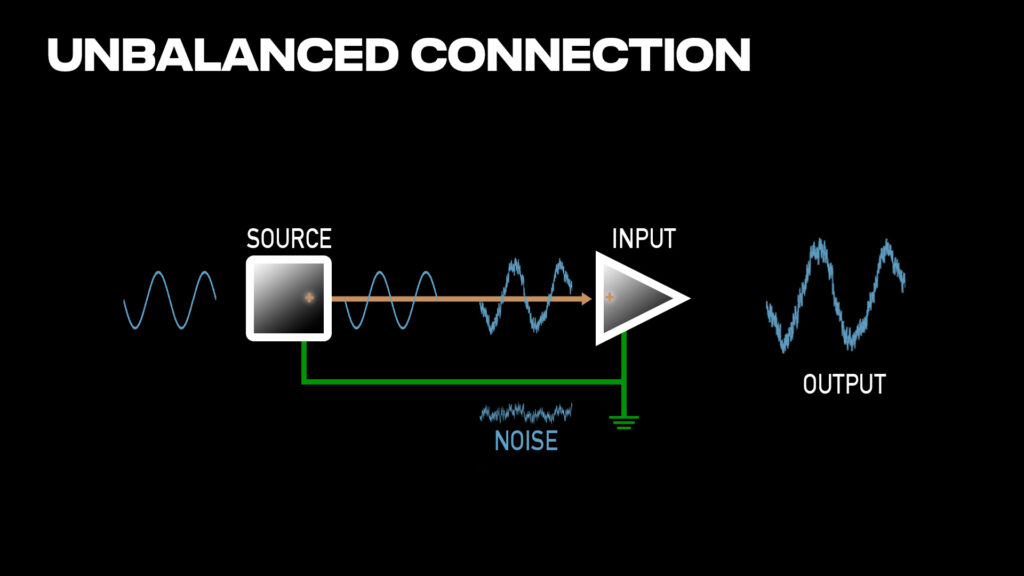
An unbalanced connection has one signal wire and a ground. Any noise picked up along the cable rides directly into the input.
The problem with unbalanced connections is that any electrical interference – hum from lighting dimmers, buzz from power cables, computer power supplies, RF from wireless devices – gets picked up by the signal wire and added directly to your audio. The longer the cable run, the more noise you collect. This is why instrument cables are typically kept short (under 20 feet is ideal).
Unbalanced Connectors
TS (Tip-Sleeve) 1/4″ Connector
The most common unbalanced connector is the 1/4″ TS cable – the standard instrument cable you’d use for guitars, bass, and keyboards. If you look at the connector, you’ll see two sections separated by a black ring:
- Tip – Carries the audio signal (positive)
- Sleeve – Carries the ground
This is the cable you’ll find on electric guitars, bass guitars, keyboards, and guitar amplifiers. One thing to note: while the connector looks similar to a speaker cable, instrument cables and speaker cables are built differently. Instrument cables use thin shielded wire for low-level signals, while speaker cables use thicker unshielded wire for high-current signals. Always use the right cable for your application.
RCA Connector
RCA connectors are another unbalanced connection, commonly found on consumer audio equipment, DJ gear, and some keyboards. Like TS cables, they carry one signal wire and one ground – just in a different physical format.
What Is Balanced Audio?
A balanced audio connection uses three conductors: two signal wires (positive and negative) plus a ground/shield. The audio signal is carried on both signal wires, but one is inverted (flipped in polarity).
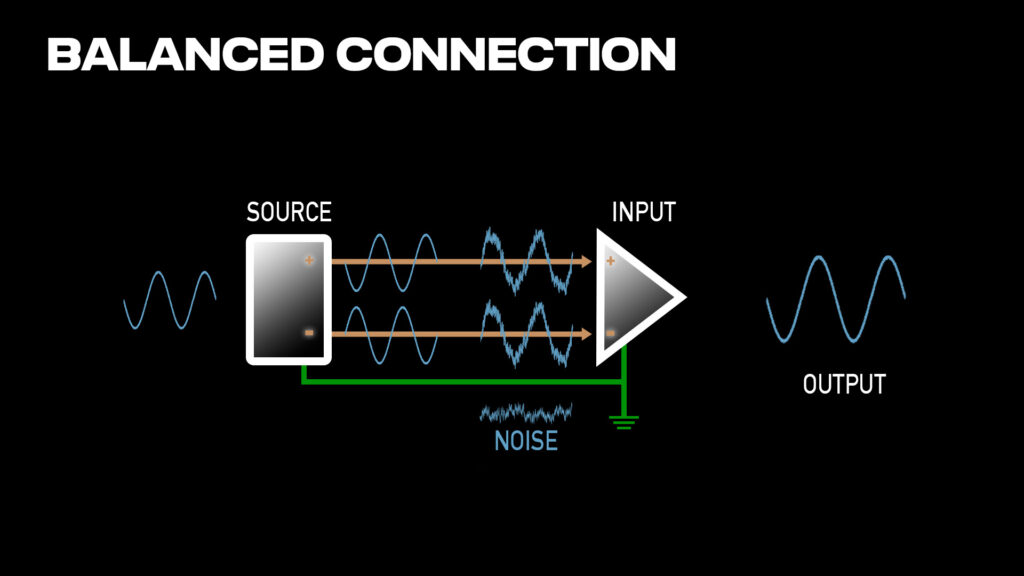
A balanced connection carries the signal on two wires – one normal, one inverted. Noise picked up equally on both wires cancels out at the input.
Here’s where it gets clever. When electrical interference hits a balanced cable, it affects both signal wires equally. At the receiving end, the balanced input flips the negative signal back to normal polarity and combines it with the positive signal. The wanted audio (which was opposite on the two wires) adds together correctly. But the noise (which was identical on both wires) cancels out completely.
This is called common-mode rejection, and it’s why you can run balanced cables over long distances – 100 feet or more – without picking up significant noise.
Balanced Connectors
XLR Connector
The XLR connector is the standard for professional audio. It has three pins:
- Pin 1 – Ground/shield
- Pin 2 – Positive (hot)
- Pin 3 – Negative (cold)
XLR cables are used for microphones, connections between professional audio gear, and the outputs of DI boxes. The locking mechanism also prevents accidental disconnection – very useful on stage.
TRS (Tip-Ring-Sleeve) 1/4″ Connector
A TRS connector looks similar to a TS connector, but has an additional section – the ring – between the tip and sleeve:
- Tip – Positive signal
- Ring – Negative signal (inverted)
- Sleeve – Ground
TRS cables are used for balanced line-level connections between professional gear, insert points on mixing consoles, and monitor outputs. Many audio interfaces and consoles use TRS jacks for their balanced inputs and outputs.
The Headphone Cable Confusion
Here’s where people often get confused. Headphone cables also use TRS connectors – tip, ring, sleeve – but they are NOT balanced. A headphone TRS cable carries:
- Tip – Left channel
- Ring – Right channel
- Sleeve – Ground
It’s a stereo unbalanced connection, not a mono balanced connection. You cannot plug headphones into a balanced TRS output on your console and expect it to work correctly. The balanced output is sending positive and inverted negative signals, not left and right channels.
Similarly, you can’t take a headphone extension cable and use it as a balanced cable between gear. Even though the connector has three sections, it’s wired for stereo, not balanced audio.
The Behringer X32 and Midas M32 have dedicated 1/4″ headphone outputs that are designed for headphones. If your headphones have a 1/8″ (3.5 mm) connector, you’ll need an adapter to plug into the console’s 1/4″ headphone jack.
Why Balanced Connections Matter
In any audio situation, using balanced connections is going to give you better audio quality than unbalanced. The noise rejection means you can run longer cables without degradation, and you’re protected from interference that would otherwise contaminate your signal.
Professional audio gear uses balanced connections almost exclusively. Microphones output balanced signals either directly from the capsule or through a transformer inside of the microphone handle. Consoles have balanced inputs and outputs. Stage boxes use balanced connections throughout.
The challenge comes when you need to connect unbalanced sources – guitars, bass, keyboards, computers – to your balanced console inputs. That’s where DI boxes come in.
DI Boxes: The Unbalanced-to-Balanced Solution
A DI box (direct injection box or direct box) converts an unbalanced, high-impedance signal to a balanced, low-impedance signal. This lets you connect instruments directly to your audio console while maintaining signal quality over long cable runs.
What DI Boxes Do
DI boxes solve three problems at once:
1. Balanced Conversion The unbalanced 1/4″ input becomes a balanced XLR output. Now you can run a long XLR cable to your console without picking up noise.
2. Impedance Matching Instrument pickups (especially in guitars and bass) need a high-impedance load to sound correct – typically above 1M ohm. Audio consoles have much lower input impedance (often 1-20k ohm). This mismatch changes the tone of the instrument in a negative way. DI boxes provide the high-impedance load the instrument expects, then output a low-impedance signal the console expects.
3. Ground Loop Elimination When your instrument is plugged into an amp on stage and your console is plugged into a different electrical circuit across the room, you can get ground loops – that annoying 60 Hz hum (50 Hz in some countries). DI boxes have a ground lift switch that isolates the audio ground, breaking the ground loop while still passing the audio signal. (Also to note, if you are ever looking to remove a ground loop from an XLR connection, check out the Sescom IL-19 In-Line Audio Hum Eliminator, or you can also use an in-line XLR Ground Lift)
Active vs Passive DI Boxes
Passive DI boxes use a transformer to convert the signal. They don’t need power, handle high output sources (like keyboards) very well, and the transformer naturally isolates ground. The quality depends entirely on the transformer quality.
Active DI boxes use electronic circuitry with a preamp. They require power, either +48 V phantom power from your console or an internal battery. Active DIs typically offer higher input impedance, making them ideal for instruments with passive pickups like acoustic guitars and bass guitars.
A good rule of thumb: use passive DI boxes for active instruments (keyboards, active bass guitars) and active DI boxes for passive instruments (acoustic guitars, passive bass guitars, piezo pickups).
Recommended DI Boxes
If you’re looking for quality direct boxes, check out the Radial StageBug series:
- Radial StageBug SB-1 – Active DI box (requires +48 V phantom power)
- Radial StageBug SB-2 – Passive DI box
- Radial StageBug SB-5 – Great for interfacing a computer down a single mono XLR line
For a deeper look at DI boxes and premium recommendations, check out my complete guide: All About DI Boxes
Summary
Understanding balanced vs unbalanced audio helps you make better decisions about cabling and signal flow:
- Unbalanced (TS, RCA) – One signal wire + ground. Susceptible to noise. Keep runs short.
- Balanced (XLR, TRS) – Two signal wires + ground. Noise cancels out. Can run long distances.
- Headphone TRS – Stereo unbalanced, NOT balanced. Don’t confuse them.
- DI boxes – Convert unbalanced to balanced, match impedance, and eliminate ground loops.
When in doubt, use balanced connections wherever possible, and use a quality DI box whenever you need to get an unbalanced instrument signal to your console.