Church Audio Consulting & Troubleshooting
Get expert help for your worship audio system—from one-time troubleshooting to ongoing support.
How Consulting Works
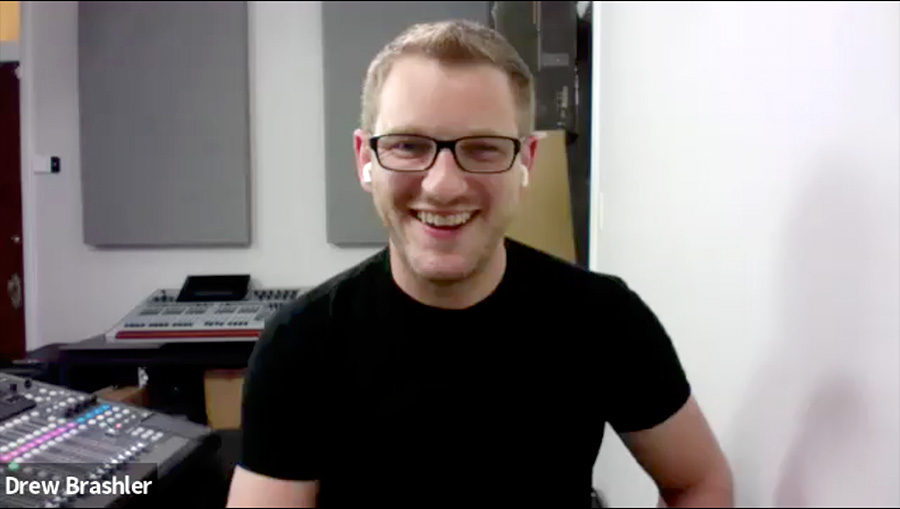
Every consulting session is a live video call where we work together on YOUR specific challenges.
I’ll screen share with your console, walk through your settings, troubleshoot problems in real time, and help you build better mixes. You’ll get a recording of every session so you can reference it later.
This isn’t generic advice—it’s hands-on help tailored to your system, your space, and your team.
What We Can Work On Together
Troubleshooting
Something’s not working and you can’t figure out where to look. Maybe inputs aren’t showing up where you expect, aux sends are routing to the wrong places, or feedback changes depending on who’s at the mic. I’ll help you track down routing problems, eliminate hum and buzz from specific channels, find effects that are disappearing, and make sense of settings left behind by previous volunteers. We’ll work through your system methodically until we find exactly what’s wrong.
Mixing & Training
You want to build a better mix but don’t know where to start. I’ll help you balance vocals, drums, and instruments and get more out of your mix. We’ll dial in EQ and compression, set up effects like reverb and delay properly, and optimize your sound for your specific space. If you’re training volunteers, I’ll walk your team through the console’s features and workflow so everyone feels confident running sound – not just you.
Streaming
Your in-room audio sounds fine, but online it’s a mess. I’ll help you set up streaming audio routing from your console to platforms like YouTube and Facebook, balance your in-room mix against what viewers hear online, and fix sync or quality issues that make your stream sound hollow or delayed. Whether you’re streaming for the first time or trying to improve what you already have, we’ll make your online audio sound as good as what people hear in the room.
Consulting Options
Single Session
One 90-minute troubleshooting call to solve a specific problem or get training on your system.-
90-minute video call
-
Session recording
-
Monday-Friday availability
Three Session Package
Save with three sessions for ongoing projects, team training, or system optimization.-
Three 90-minute video calls
-
Email support between sessions
-
Session recordings
Monthly Retainer
Have an expert on speed-dial: monthly sessions plus support when you need it.-
Monthly 90-minute call
-
Text + email support anytime
-
Weekend on-call availability
Frequently asked questions
What consoles do you support?
I specialize in Behringer X32, WING, and X-Air consoles (including Midas M32 and M-Air versions). I regularly work with Allen & Heath SQ and QU series, Yamaha DM series (DM3 & DM7) and QL/CL Series, Avid VENUE series (S6L, Profile, SC48).
I am also well versed in Dante and Waves SoundGrid protocols, Wireless RF Coordination, Online Streaming (Resi & OBS), and ProPresenter. If you have questions about integration of the rest of your gear together with your audio console, I can help with any of those questions.
If you have a different console and you’re not sure if I can help, feel free to reach out and ask. If I can’t help with your specific console, I’ll be honest about it and try to point you in the right direction.
What do I need for a video call?
You’ll need Zoom (it’s free to download), a decent internet connection, and your console powered on.
If your console can connect to a computer that can be on the Zoom call (like with X32-Edit or WING-Edit), that makes screen sharing easier, but it’s definitely not required. We can work just fine with a camera pointed at the console. I find it best to have a FAT formatted USB drive nearby in case we need to save or update something.
Do I need to prepare anything before our session?
It is helpful to have a clear idea of what you want to work on. I always suggest making a list and ordering it by priority, that way we can tackle the big problems first.
Having your scene/snapshot saved to your computer so you can share it with me can help speed things up. If you don’t know how to do this, I can help walk you through it during the call.
I find it best to have a FAT formatted USB drive nearby in case we need to save or update something. Also if you have a recorded multitrack, you can always share those audio files with me prior to our call, that way I have access to them for our session.
Lastly, if you have a specific problem, it helps if you can recreate it during our call so we can troubleshoot it together.
How do I know which option to choose?
Here’s a quick guide:
Single Session – You have one specific problem to solve or want to learn one thing. We fix it and you’re done.
3-Session Package – You have a project with a clear endpoint – setting up a new system, training your team, or building a solid mix. Three sessions gives us time to work through it properly.
Monthly Retainer – Your needs are ongoing. You’re constantly troubleshooting something new, training volunteers who need backup, or dealing with a system that keeps changing. It’s basically having someone you can text on Sunday morning if something breaks.
Not sure? Start with a single session and see if you need more.
What does the 3-month minimum mean?
When you set up as a retainer client, you’re committing to three months of monthly payments ($800/month = $2,400 total). This ensures we have enough time to actually make meaningful progress rather than just scratching the surface.
After those first three months, it becomes month-to-month and you can cancel anytime with 30 days notice.
When are you available for sessions?
Single sessions and 3-packs are scheduled Monday through Friday during business hours (Eastern Time).
Monthly retainer clients get Saturday & Sunday availability in addition to weekday hours. This is especially helpful if your volunteers work full-time jobs and can only meet on weekends or run into a problem before service.
What's included in text and email support?
Between your monthly retainer sessions, you can text or email me quick questions and I’ll respond within 24 hours (usually faster). This is designed for straightforward questions that need a quick answer – things like “Which setting controls this specific feature?” or “Can you remind me how to route this?” or “What was that EQ frequency we discussed?”
If your question requires more than a brief explanation – like walking through a complex troubleshooting process, reviewing multiple settings, or explaining a concept in depth – we’ll save it for your next scheduled session where we can work through it properly on a video call. This ensures you get the attention and detail those bigger questions deserve, rather than trying to solve complex issues over text.
The goal of text and email support is to keep you moving forward between sessions, not to replace the value of our scheduled calls. Quick answers to keep you unstuck, detailed work during our sessions.
Ready to get started?
Whether you need help solving one specific problem or ongoing support throughout the year, I’m here to help.